DM Multicam: Film a Soccer Game From Every Angle, Replay the Goal While It’s Still On
Filming a youth soccer game usually means one parent, one phone, one angle, and a goal that happened at the other end of the pitch. DM Multicam turns every iPhone on the sideline into a camera and one phone into the director. The cameras start together, record the whole half on their own, and send the director a replay of the goal while the game is still being played.
One app, three jobs, no crew
Film. Any iPhone on a tripod or gimbal. Tap Record and walk away, or let the director run it. It keeps recording even if everything else fails.
Direct. One phone on the sideline. It starts every camera together, drops markers for goals and shots, watches each camera’s battery, storage and heat, aims gimbals, and pulls live replays.
Review. After the game, on the iPad or the Mac. Every angle synced on one timeline, markers as the highlight spine, parents’ handheld clips folded in.
Film and Direct are the same app. The role is chosen once at launch, so any phone can be a camera one week and the director the next.
Phones talk to each other, not to the internet
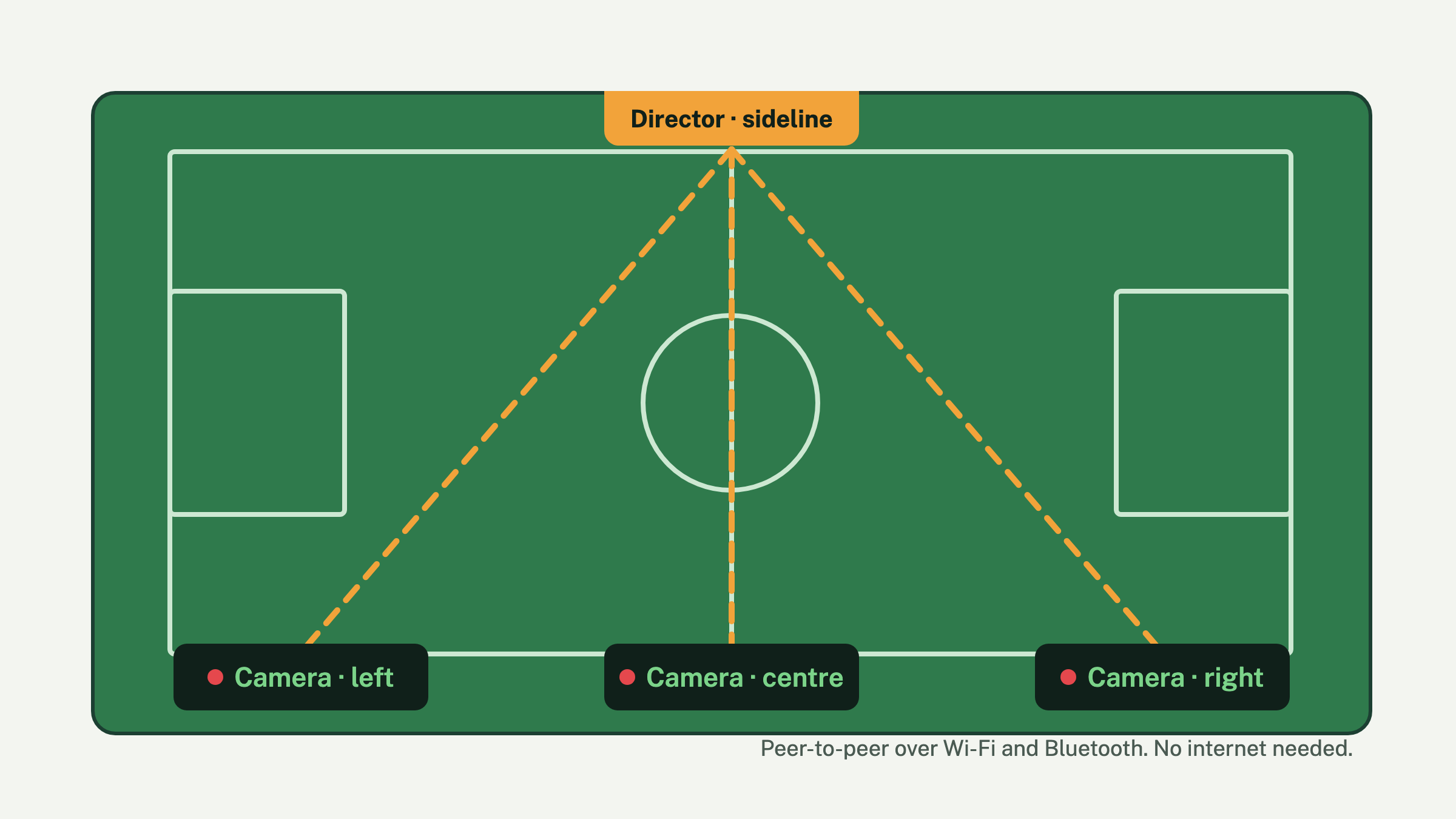
The phones find each other over Wi-Fi and Bluetooth with no network to set up and no signal required, so it works on a field in the middle of nowhere. Any number of cameras can join. Heartbeats, markers and the start command are tiny messages; video only crosses the link when the director asks for a clip or a replay. On a shared hotspot the director can also open any camera full screen as live video.
A single phone must get the whole half on its own
Everything coordinated is additive. If the director dies, the link drops, or the phone is alone, it keeps recording 1080p at 30 frames a second to its own storage. In an unplugged test an iPhone 15 recorded for 36 minutes with the screen dimmed, no stops, no heat build-up and about 5% of its battery used. Before you leave the tripod, the screen warns you about the three things that end a walk-away recording: Low Power Mode, low storage and heat.
Five taps from kickoff to review
- Set up. Home, away, date. Cameras appear as tiles the moment they open the app nearby.
- Arm. One button. Every camera starts on the same moment, two seconds out, so the angles begin together.
- Mark. Goal, shot, save, foul, corner, card, sub, or “clip this”. Each marker is timed and sent to every camera.
- End. Cameras stop and announce their clips. Short clips pull to the director automatically; a full half stays on the phone until you ask for it.
- Review. Open the match on the iPad or sync it to the Mac. Every angle plays in lockstep; tap a marker to jump there.
Replay the goal while the game is still on
The director asks every recording camera for the last 10, 20 or 30 seconds. Each phone cuts that slice out of the file it is still writing, without stopping, and sends it over. A few seconds later it is playing on the director, every angle in sync, in slow motion. Turn on Replay on marker and a Goal does it automatically, keeping 20 seconds before the moment and 5 seconds after.
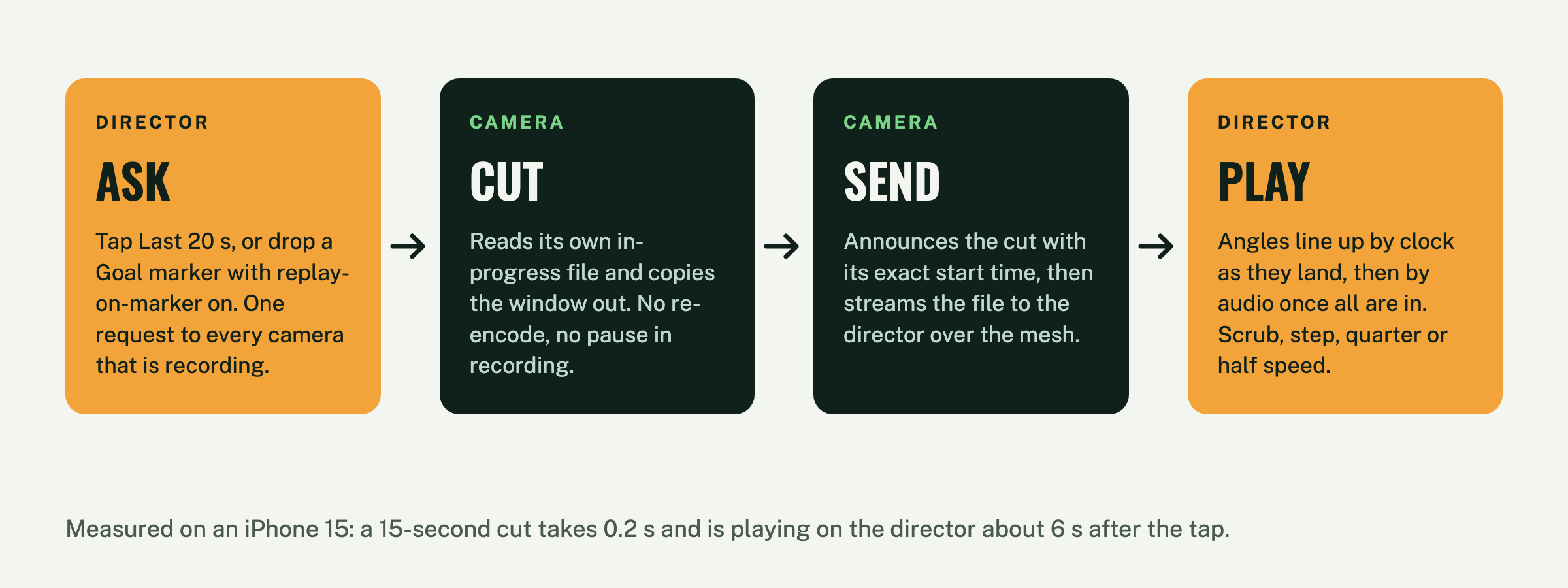
Measured, not claimed: on an iPhone 15, cutting the last 15 seconds takes 0.2 seconds and the replay is playing on the director about 6 seconds after the tap. The camera never stops recording.
Tap the pitch, every camera turns
With cameras on DockKit gimbals, the director gets a map of the pitch. Place each camera where it stands, pan it onto a corner flag or goalpost and tap to calibrate, and from then on a tap anywhere on the map turns every camera to that spot. Or flip on Auto-frame and let the gimbal follow the players on its own.
Every angle on one timeline, lined up by sound
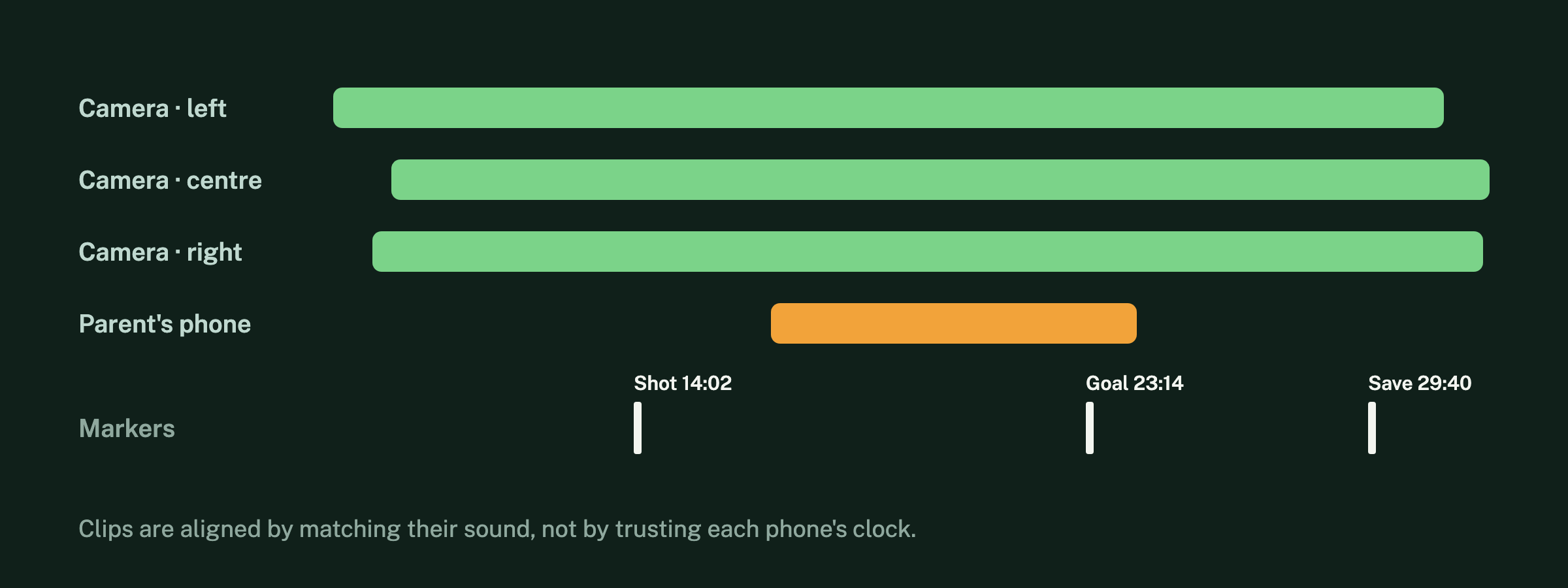
After the game the clips are aligned by matching their sound, not by trusting each phone’s clock, so the angles sit on the same timeline to within a frame or two. Import a parent’s handheld video afterwards and it drops onto the same timeline, aligned the same way. The markers you dropped during play become the highlight spine: tap Goal and every angle jumps there.
Built to survive a sideline
- If the director phone crashes, the cameras keep recording. On relaunch it sees a camera still rolling and picks the match back up, markers and all.
- If a camera drops off the link, its tile says so and the director keeps re-inviting it until it is back. The recording on the phone never stops.
- Every tile shows heat, battery and storage every few seconds. “Dim camera screens” cuts the backlight on every tripod phone; a touch wakes one for 20 seconds.
- A replay request to a camera that is not recording comes back as a reason, not silence. The other angles play.
- A full half is too big to pull over the link mid-game, so it stays on the camera with a note. One tap pulls it later, or the Mac syncs it on home Wi-Fi.
Where it goes
Today DM Multicam films, directs, replays and reviews. Next, a fixed wide camera will spot the players and steer the gimbals toward the action on its own, then two or more cameras will triangulate the ball itself, and finally the markers will pick the best angle and cut the highlight clip without a director at all. Soccer is the first sport; others are profiles inside the same app, not new apps.
Private by default
No account, no ads, no analytics. The video stays on the phones that recorded it and the ones you send it to. See the privacy policy, and the support page for setup help.
Coming to the App Store
DM Multicam is in testing on real games now and is headed for the App Store for iPhone and iPad. It needs iOS 17 or later; gimbal features need a DockKit-compatible gimbal.