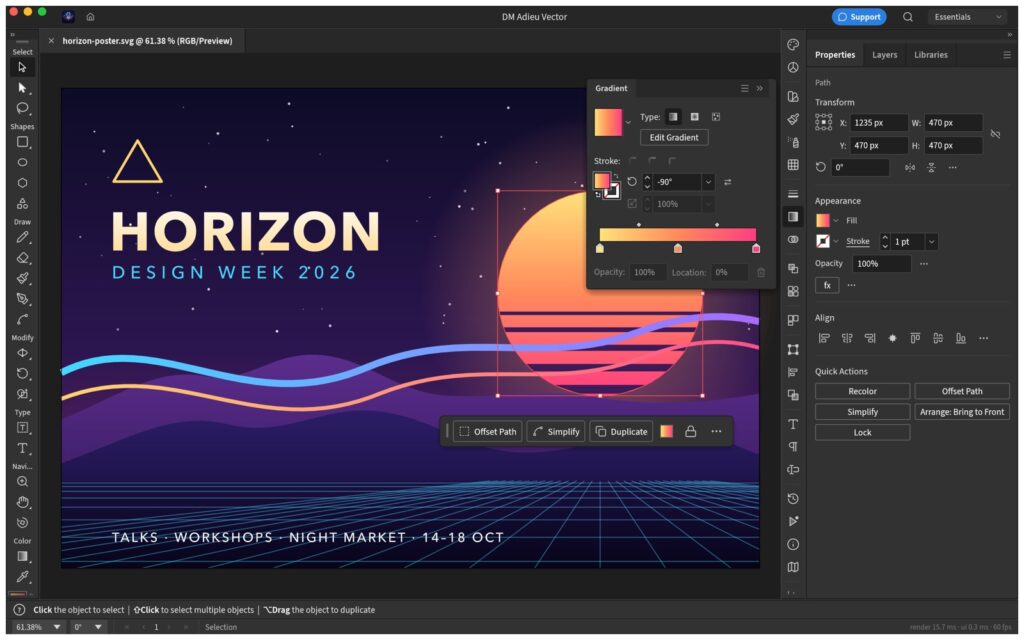
DM Adieu Vector — Vector drawing, SVG and PDF
Coming to the Mac App Store.
DM Adieu Vector is a native vector illustration app for the Mac: the Pen and real Bézier paths, shapes, gradients, type, artboards and layers, with SVG and PDF files in and out. It runs entirely on your Mac. No account, no subscription, no cloud.
Built on open source
DM Adieu Vector is based on VectorCraft, the open-source editor by the ArtCraft team, written in Rust and drawn on the GPU. We package it, run it inside the macOS App Sandbox, and support it. It is not affiliated with or endorsed by the ArtCraft team. The source it is built from is public, under the MIT and Apache licences.
What you get
- The Pen, Curvature, Pencil and shape tools, with anchors and handles you edit directly.
- Pathfinder and Shape Merge, offset and outline paths, live corners and blends.
- Linear, radial and freeform gradients, swatches, Recolor, transparency and blend modes.
- Several fills and strokes on one object, and live effects such as shadows and glows that stay editable.
- Point and area type, type on a path, threading, character and paragraph styles, and right-to-left scripts.
- Multiple artboards, layers, symbols, guides, a perspective grid and Trace Image.
- Opens SVG, PDF, EPS, DXF, EMF and WMF files and common images. Exports PNG, JPEG, WebP, GIF, TIFF, SVG, PDF (including PDF/X), EPS and DXF, one artboard or all of them at once, and prints.
Honest about where it stands
The editor underneath is young (an alpha) and improving every week. Everyday illustration works, but some tools you may be used to are missing or still rough: about half of the raster effects are still to come, and there is no scripting and there are no generative features. Updates will be frequent. Expect a capable editor today and a better one each month.
Mac only, macOS 11 or later, Apple silicon and Intel. Support · Privacy policy