DM Flowchart Designer
Flowcharts that build themselves.
Describe a process and watch it draw itself, styled and connected. Or start from a template and shape every box by hand. A native app with a fast, keyboard-friendly canvas and no learning curve.
Free to download · Pro is a one-time $9.99, not a subscription
See it in under a minute
Templates, AI that draws for you, and swimlanes for work that crosses teams.
With narration · Captions available in the player
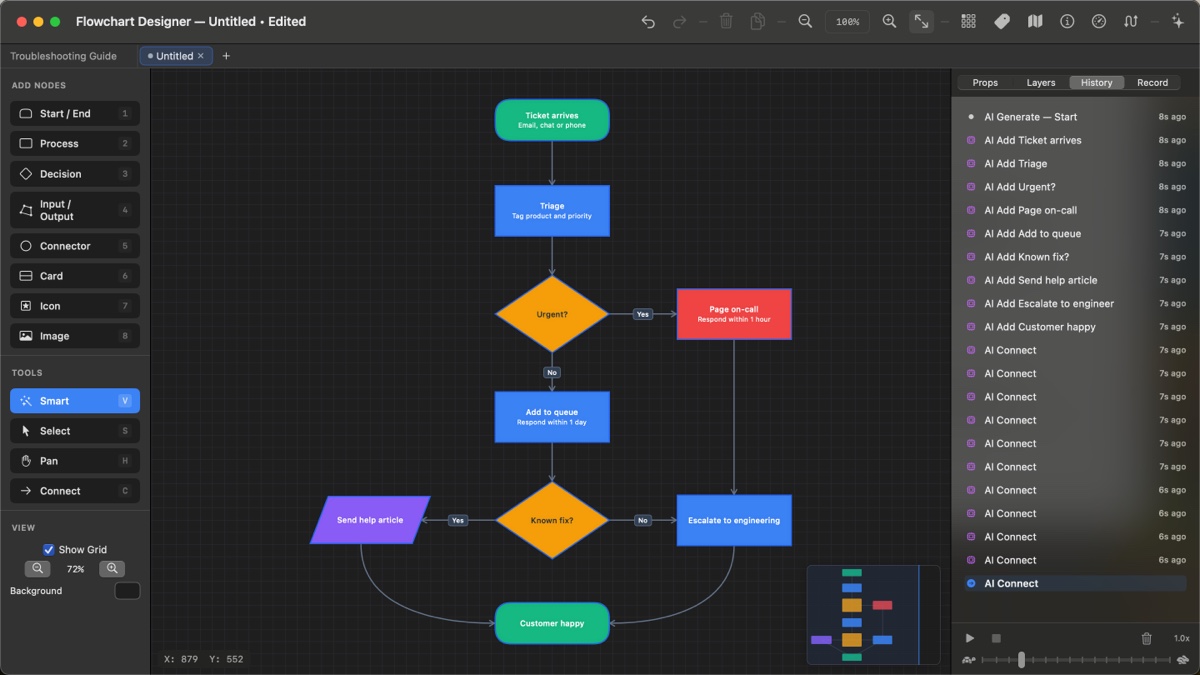
Tell it what you need. It draws the chart.
The AI lays out the boxes, picks the shapes, colours the decisions and connects everything, right on your canvas, one step at a time. Every step can be undone.
Use the chat AI you already have
Copy the prompt the app writes, paste it into ChatGPT, Gemini, Claude or Copilot, even the free versions, and paste the answer back. No account and no key.
No extra cost
Built in, nothing to set up
We run the AI for you: generate and modify charts right inside the app, without leaving it and without an API account.
$14.99 a month · first week free
Bring your own provider
Use your own Anthropic, OpenAI, Google or xAI key. It stays in your Keychain and is sent only to the provider you choose.
You pay the provider directly
The AI Assistant is part of Pro. Pick any of the three, and switch whenever you like.
Who does what, at a glance
When a process crosses teams, give each team its own lane. Resize lanes by dragging the dividers, add or reorder them in the panel, and give the whole container a title.
- Boxes move with their lane
- Connections always draw on top of the lanes
- Columns or rows, with your own lane colours
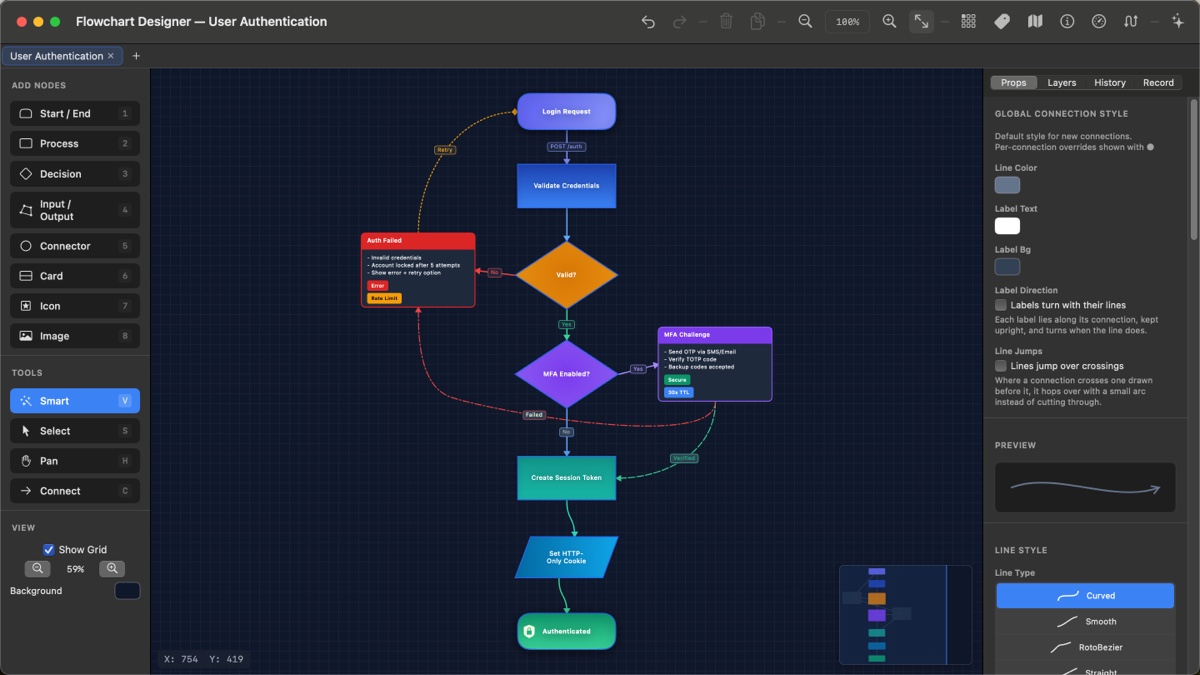
A finished chart in one click
Start from a polished template, from a basic flowchart to a decision tree, a troubleshooting guide or a CI/CD pipeline, then make it yours. Rich cards, badges, gradients and dashed retry paths are all there to borrow.
Lines that read clearly
Draw from any edge of a box. Route with waypoints or let the app re-route for you, and label every branch.
- Curved, straight or right-angle lines
- Labels, with an optional icon beside the text
- Line jumps: a small hop where lines cross
- Split a line with a junction and branch off it
Every template, building itself
Fourteen ready-made charts come with the app. Hover or tap one to watch it draw, then open it in Flowchart Designer and make it yours.
Professional tools, none of the clutter
Take a closer look
Click any screen to see it full size.
Every action at your fingertips
Hold the spacebar to pan, press a number to drop a box, and never reach for a menu.
Free to start. Pro once, forever.
Free
- Unlimited flowcharts on an infinite canvas
- Every shape and all the styling
- 13 of the 14 templates
- PNG export
Pro
- The AI Assistant, with Any AI or your own key
- Record & Transcribe
- PDF and SVG export
- Multiple tabs and every template
- Restore on your other devices
Hosted AI
- AI that works inside the app with no key
- Generate and modify charts in one click
- Cancel anytime in your Apple account
Questions & answers
Does it work on iPad?
Yes. One app runs natively on Mac (macOS 14 or later) and iPad (iPadOS 17 or later). Buy Pro once and Restore Purchases brings it to your other devices.
Do I need an API key to use the AI?
No. With Any AI you copy a prompt into any chat AI, including free ones, and paste the answer back. Hosted AI runs the AI for you inside the app. If you already have an Anthropic, OpenAI, Google or xAI key, you can use that instead. The AI Assistant is part of Pro.
Is Pro a subscription?
No. Pro is a one-time $9.99 purchase. The only subscription is Hosted AI, and it is optional.
Where are my files stored?
Your flowcharts are plain .json files saved wherever you choose. There is no account and no cloud storage: your work stays on your device unless you share it. When you use AI, only the request goes to the AI you picked.
Can it really turn a lecture into a diagram?
Yes, with Record & Transcribe in Pro. Record a lecture, lesson or meeting and watch the words appear as they are spoken. When you stop, the AI lays the recording out as notes or a flowchart. Every note remembers the moment it came from, so clicking it plays the audio from exactly there. Recordings stay on your device; transcription uses Apple’s speech recognition.
What can I export and import?
PNG for free, and vector PDF and SVG with Pro. You can import PNG, JPEG, GIF and TIFF images, or a PDF page, which keeps its vector data when you export back to PDF.
Is there a manual?
Yes, three: the User Guide built into the app, the full guide on the web, and a downloadable PDF manual.
Where do I get help?
Use the contact form. A real person answers, usually within a business day.
