DM Track
DM Track — Support
Support for the DM Track apps: DM Track Timer (iPad), DM Track Remote (iPhone), and DM Track Booth (Mac). If you don’t find your answer here, email [email protected] and a human will reply.
Quick start on iPhone — time your first race
- Open the app and tap Solo Timer.
- Allow camera and microphone access. The camera records the finish; the microphone listens for the gun.
- Point the phone at the finish line.
- Tap Arm gun, then fire the starter (a loud clap works for testing). The clock starts on its own. Or tap Start to begin manually.
- Tap the lane numbers as athletes cross.
- Tap Stop, name the race, and save.
You need nothing else — no other devices, no network, no account.
Quick start on iPad — run a meet
- Open DM Track Timer and dismiss the welcome sheet.
- Open the sidebar with the button in the top-left corner.
- Tap New Meet and pick a template — for example High School (JV / Varsity). This builds the whole event list, split by division and gender.
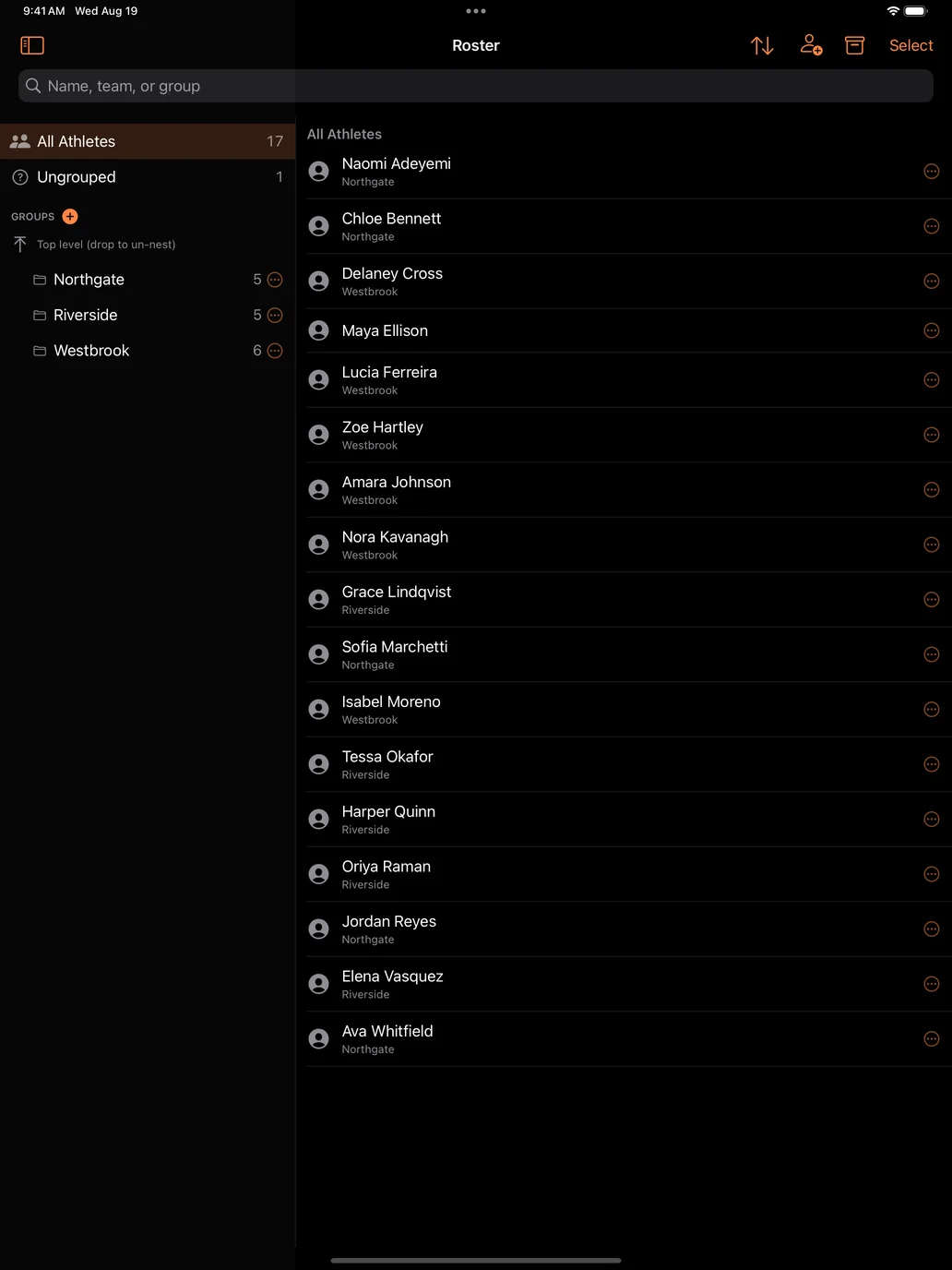
- Tap Roster to add athletes. To add a lot at once, use the sidebar gear → Import Roster and paste one athlete per line as
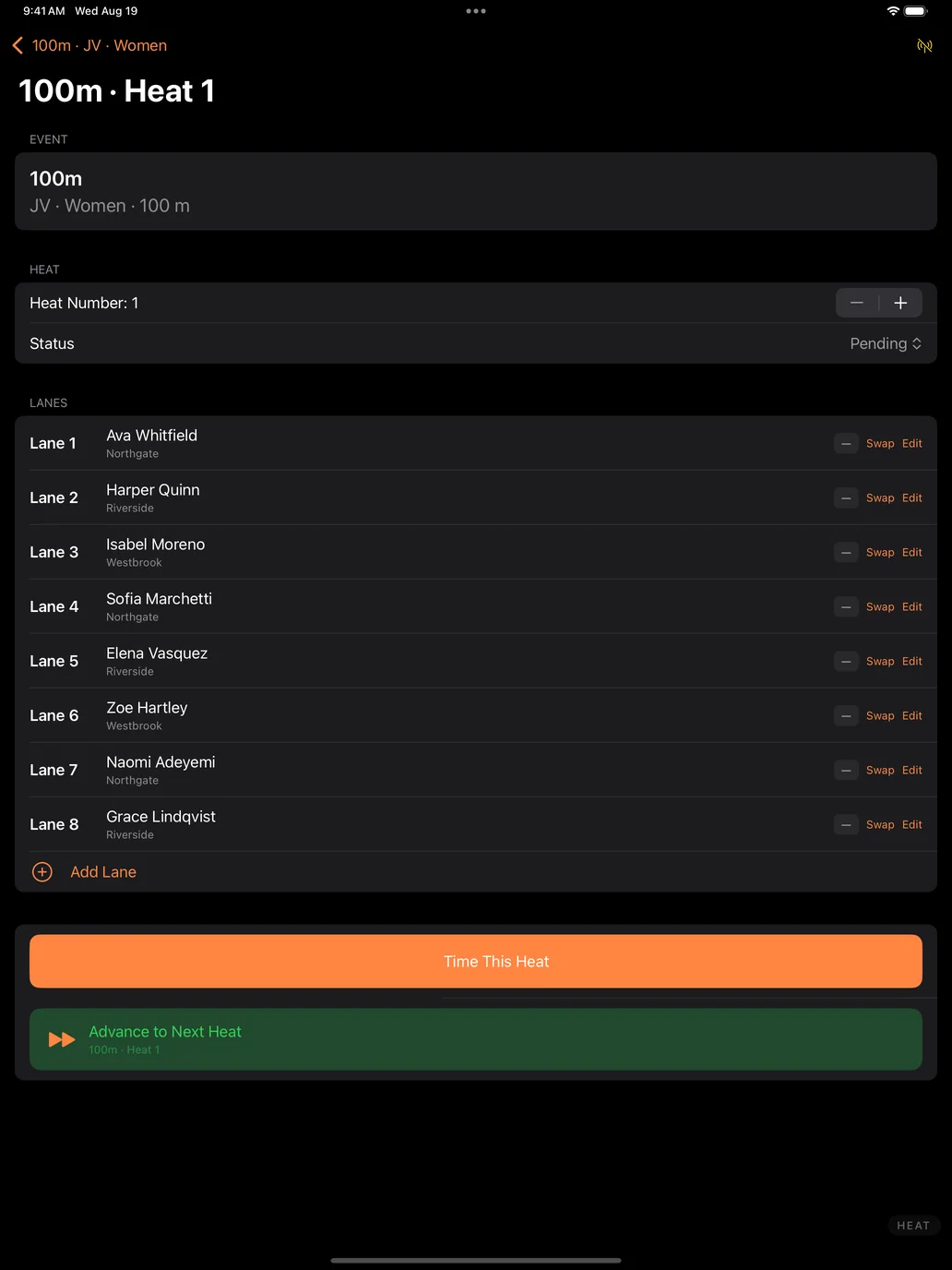
First Last (Team). - Open a division to reach its heat, and put athletes in lanes. Heats can also be seeded from past marks.
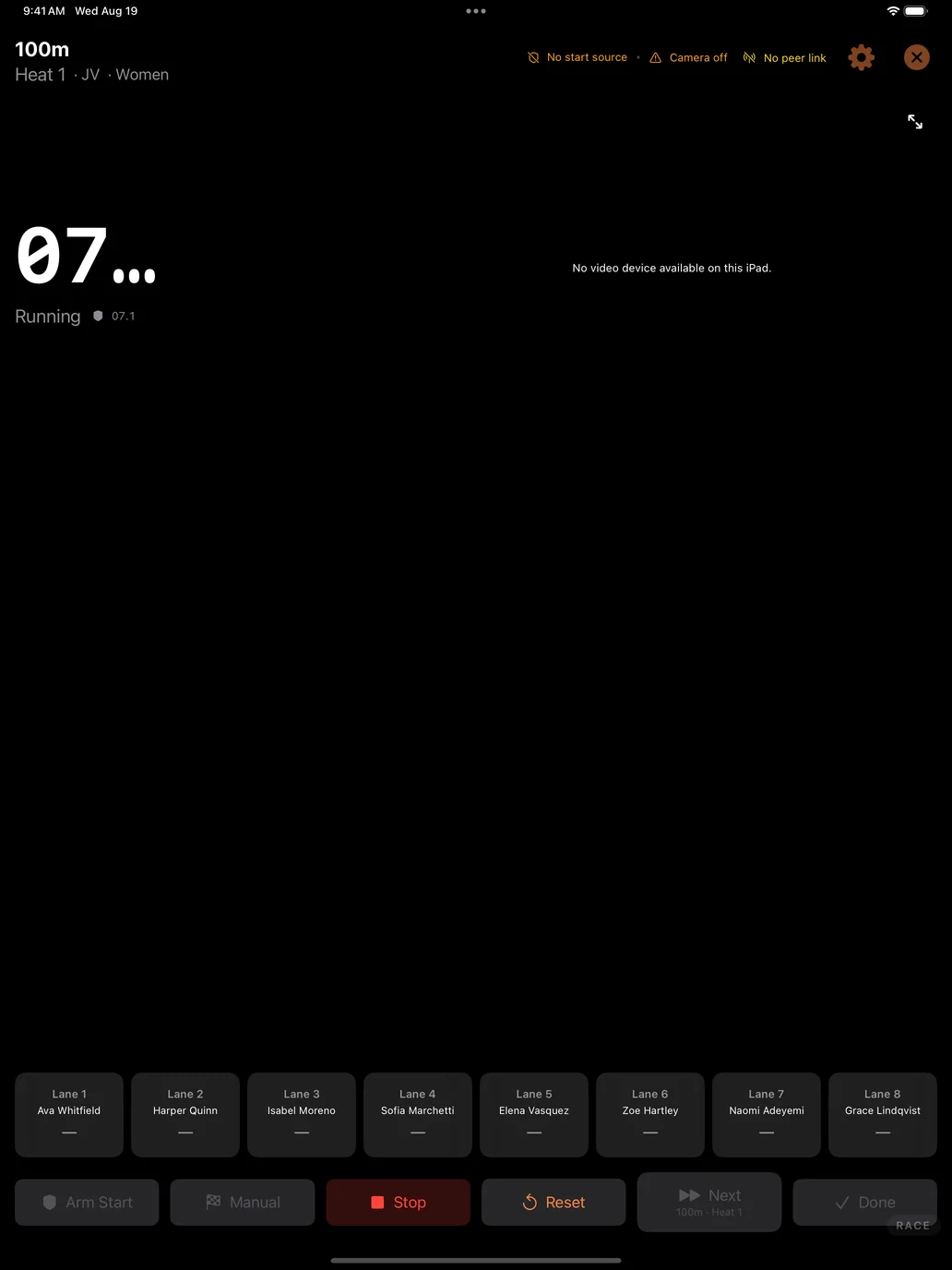
- Tap Time This Heat, start the race, and tap lane buttons as athletes cross.
Everything above works on one iPad with no network connection and no account. Cameras, iPhones, an Apple TV scoreboard, and a Mac are all optional additions.
Which app do I want?
- DM Track Timer (iPad) — run and score a whole meet: schedule, roster, heats, timing, results, scoreboard.
- DM Track Remote (iPhone) — time a single race by yourself with Solo Timer, or act as a camera angle at a bigger meet.
- DM Track Booth (Mac) — the control room: multi-camera switching, graphics, replay, and broadcast.
Fixing times after the race
Open a saved race from Races or the Recent list. The video plays back with an audio waveform underneath — the starting gun is usually the tallest spike in that waveform.
- Adjust a time: tap the finish in the list. The video jumps to that moment and the controls open. Use Set here to snap it to the current frame, or the −0.10 / −0.01 / +0.01 / +0.10 buttons to nudge.
- Add a finish you missed: scrub to the crossing and tap Add finish at playhead, then pick the lane. It sorts into its correct place automatically.
- Fix the start: find the gun in the waveform, scrub to it, and tap Gun was here. Every finish time shifts together.
- Change a lane: tap the finish, then pick the lane number in the controls.
- Delete a mis-tap: swipe left on the finish.
Frequently asked
The gun isn’t starting the clock
Make sure you tapped Arm gun first — the meter moves whenever the app is open, but a detected sound only starts a race when armed. Watch the level meter while someone claps: if the bar barely moves, lower the sensitivity threshold; if it triggers on crowd noise, raise it. On a windy day, manual Start is more reliable than any microphone.
How accurate is it?
As accurate as your frame rate. One frame at 30 fps is about 33 milliseconds; at 240 fps it is about 4. Set the frame rate on the Solo Timer screen — the app shows what one frame is worth as you change it. Higher frame rates use more storage and may reduce the capture resolution on some devices.
Where are my recordings?
Inside the app, under Races. They are stored privately in the app, not in your Photos library. When the app’s storage allowance fills, it removes the oldest video clips first — recorded times are always kept, even after a clip is cleared.
Do I need an internet connection?
No. The Solo Timer works completely offline. Network features (running a meet across several devices, or Cloud Sync) are optional.
The camera preview is black
Check that camera access is allowed in Settings → DM Track Remote. If you were recording when the phone locked or you switched apps, reopen the Solo Timer screen to restart the camera.
Can I use several phones and a Mac together?
Yes. DM Track Remote is also one device in a larger system — several camera phones, an iPad running DM Track Timer or a Mac coordinating the meet, an Apple TV scoreboard, and video review across angles. The devices find each other over your local Wi‑Fi, so allow Local Network access when asked.
Privacy
Solo Timer recordings and race times stay on your device. There are no ads and no trackers, and Cloud Sync is off until a coach turns it on. Full details are in the DM Track Privacy Policy.
Contact
Bug reports, feature requests, and questions: [email protected]. Telling us your device model, iOS version, and what you were doing helps enormously.
DM Track Timer — Run the Whole Meet from One iPad
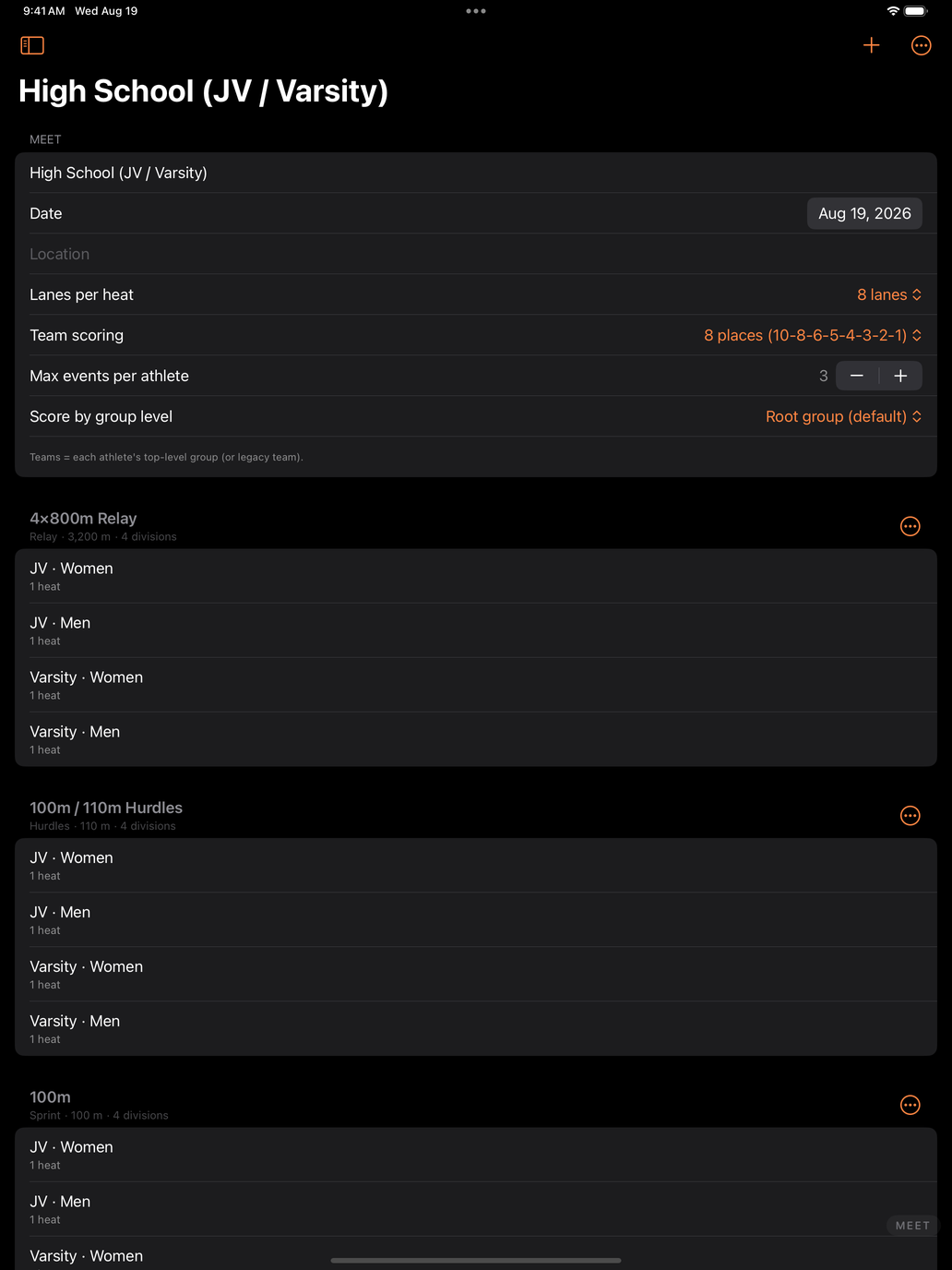
A track meet is a scheduling problem wearing a stopwatch. Eleven events, four divisions each, eight lanes at a time, and a clipboard that has to survive the whole afternoon. DM Track Timer puts the entire scoring table on one iPad — the schedule, the roster, the heats, the timing, and the results — and it works start to finish with no network connection and no account.
Start with a real schedule, not a blank page
Create a meet from a built-in template — High School (JV / Varsity), Middle School with divisions, or sprints and relays for a practice meet. Each one builds the full event list, split by division and gender, with a heat under every division. You are editing a meet within seconds instead of typing one out.
Build the roster once, use it all season
Athletes live in teams and groups that carry across the season. Paste a whole roster in at once, assign event entries, mark who is out and why, and reuse the same list meet after meet. Heats can seed themselves from past marks, so lanes are filled sensibly instead of by hand at the scoring table.
Time every race
Arm the race, start on the gun, and tap lanes as athletes cross. Point the iPad’s camera at the finish line and it can detect the crossings for you. Camera and detection are set at the meet level, so you calibrate once at the start of the afternoon and every heat after that inherits it — there is nothing to redo between races.
Results and team scoring keep themselves current
Places, times, and team points update as heats finish, with configurable scoring depth. Field events are supported with proper tie handling. Standings are always up to date, so nobody is waiting on a spreadsheet to find out where the meet stands.
Put it on the big screen
Send live results and heat information to an Apple TV so athletes, coaches, and parents can follow along between races — the meet stops being a rumour in the bleachers.
Add cameras when you want them
Bring in iPhones running DM Track Remote as extra camera angles for finish-line video and review. Add a Mac to run a full broadcast with graphics and replays. Start with just the iPad and add pieces only when a bigger meet asks for them.
Private by default
Meet and roster data stays on your iPad. There are no ads and no trackers, and cloud sync — for sharing a team’s data across your own devices — is opt-in and off until you turn it on. The full DM Track Privacy Policy has the details, including how athlete records are handled for schools.
Video belongs to the meet, and the meet belongs to the school
Cameras at a track meet record everyone in the race, not just one athlete. A finish-line clip of your daughter also contains five other people’s children. We think that fact should decide how the video is handled, so it does.
Recording is authorised by the host school, not assumed from the crowd. The school or organisation running the meet decides whether cameras are used, what is kept afterwards, and whether race video may ever be offered to families. It is the same basis schools already use for team photographs, yearbook coverage, and streamed games — and the same basis every sports-video company works on. We are not in the business of asking one parent for permission to film another parent’s child.
What that means in practice:
- The school sets the terms. No cameras, cameras for timing only, or cameras plus video families can see — their call, meet by meet.
- Nothing from the crowd reaches a screen on its own. Any message or video a spectator submits waits for a meet official to approve it. There is no path from a stranger’s phone to the venue screen that skips a person.
- Your own cameras are directed from the booth. During a race the booth can cut between the meet’s cameras and post replays hands-free, so one person can run a whole afternoon. That automation covers the school’s own cameras, pointed where the school pointed them — and it can be switched off entirely, so that nothing reaches the screen until an official approves each shot.
- The footage stays the school’s. We do not sell meet video to third parties, license it for advertising, or use it to train anything.
- If race video is ever offered to families, the school agrees to it first — and shares in it. A meet’s video is the school’s asset, not ours.
Athletic directors are welcome to ask for this in writing before a single camera is set up. We would rather have that conversation early than explain ourselves afterwards.
Coming to the App Store
DM Track Timer for iPad is heading to TestFlight and the App Store, alongside DM Track Remote for iPhone and the Mac control-room app, DM Track Booth. If you coach or officiate and want early access, get in touch at [email protected]. Setup questions are answered on the support page.
DM Track Privacy Policy
Last updated: August 31, 2026
DM Track is made by Dependent Media. It is software for timing and recording track & field meets. This policy explains what the apps store, what leaves your device, and what we can see. It covers DM Track on iPhone, iPad, Mac, and Apple TV, and the DM Track Spectator app for people attending a meet.
We do not sell your data. We do not use advertising or analytics SDKs, and we do not track you across other apps or websites.
The short version
DM Track handles data in three separate tiers. Which ones apply depends entirely on how you use it.
| Tier | What happens | Can Dependent Media see it? |
|---|---|---|
| On your device | Solo Timer recordings, race times, app settings | No |
| On your local network | Devices at a meet share video and results directly with each other | No |
| Cloud Sync (opt-in, off by default) | Team and meet data syncs to our server | Yes |
If you only use the app to time races on one device, nothing leaves that device and we never receive any of it.
1. Data stored only on your device
The Solo Timer records video and race times to the app’s private storage — video and audio from your camera and microphone, the race clock, and the finish times you record. This data stays on your device. It is not uploaded to us. Deleting a race in the app, or deleting the app, removes it.
2. Data shared on your local network
When you run a meet with more than one device (phones, an iPad, a Mac, an Apple TV), those devices talk directly to each other over your local Wi-Fi. They exchange camera video, race timing, results, and roster information for the meet in progress. This traffic goes between your own devices. It does not pass through our servers and we cannot see it.
3. Data stored on our servers (Cloud Sync)
Cloud Sync is off by default. If a coach or administrator turns it on, the following is stored on our server (sync.dependentmedia.com) so it can be shared between that team’s own devices and people:
- Team/organization name and settings
- Meets and events — schedules, heats, results, and recorded marks
- Athlete records — first and last name, display name, bib number, team, group, event entries, availability, and performance marks
- Athlete photos, where a coach has added them
- Coach notes and feedback about an athlete
- Account information for coaches and staff — email address, and the sign-in tokens used to log in
- Device records — an identifier, device type, and name for each of your devices that connects, so they can be paired and kept in sync
- Venue and camera positions — coordinates for where cameras were placed, used to show camera locations on a venue map
- Basic operational logs needed to run the service
Who can see it
- Coaches and staff you invite to your organization can see your organization’s data.
- Athletes given a read-only login can see only their own record — their events, marks, availability, and any feedback a coach has explicitly chosen to share. Coach-private notes are never shown to athletes.
- Dependent Media can access data on the server only as needed to operate, back up, secure, and support the service.
4. Athletes and minors
DM Track is used by schools, and the athletes in it are often minors. Athlete records are created and controlled by the coach, school, or organization using the app — not by the athletes themselves. That organization decides what is entered, who is invited, and what is shared. We act on their behalf as a service provider and do not use athlete information for any purpose other than providing the service.
We do not knowingly allow athlete records to be used for advertising, profiling, or any commercial purpose. If you are a parent or guardian and want an athlete’s information corrected or removed, contact the coach or school that runs the account, or contact us and we will assist them.
5. Device permissions
| Permission | Why |
|---|---|
| Camera | Recording races and finishes; live camera feeds during a meet |
| Microphone | Detecting the starting gun, and audio on recordings |
| Local Network | Finding your other DM Track devices at a meet |
| Location (optional) | Recording where a camera is placed at a venue |
| Photos (optional) | Adding an athlete photo you choose |
Declining any of these limits the related feature but does not prevent the app from running. Solo Timer needs only camera and microphone.
6. Retention and deletion
- On-device data stays until you delete it. The app automatically removes its oldest video recordings when its storage allowance fills; race times are kept.
- Cloud Sync data is kept while the organization’s account is active. A coach or administrator can delete athletes, meets, or the entire organization. You can also email us to request deletion of an account and its data.
7. Security
Connections to our server use HTTPS. Passwords and sign-in tokens are stored hashed, never in plain text. Access to an organization’s data requires a valid session for that organization. No system is perfectly secure, but we take reasonable measures to protect this information and we act promptly on any issue we discover.
8. Children’s privacy and schools
We do not offer DM Track directly to children. Accounts are created by coaches, schools, or organizations, who are responsible for obtaining any consent required by their institution or by law before entering an athlete’s information.
9. DM Track Spectator
DM Track Spectator is a separate free app for people attending a meet — parents, athletes, and fans. It is a viewer: it shows results and plays the announcer’s audio. It does not time races or record video.
There is no account and no sign-in. You join a meet by scanning the QR code posted at the track, or by typing the short code printed under it. We never ask for your name, email address, or phone number, and there is nothing to create or remember.
When you join, the app generates a random identifier for your device and exchanges the join code for a viewing pass. Our server stores that pass, the random device identifier, which meet it is for, and when it was created and last used. That record is not linked to you as a person — it identifies a device holding a pass, nothing more.
The camera is used only to read the QR code. The scan happens on your device. No photo is taken, stored, or sent to us. If you type the code instead, the app never asks for camera access at all.
Every join code has an expiry date set by the meet organizer, and can be switched off by them at any time. When a code expires or is revoked, the passes issued from it stop working. Deleting the app removes the pass and the random identifier from your device.
DM Track Spectator does not use your location, does not upload anything from your phone, and contains no advertising or analytics SDKs.
10. Changes to this policy
If we change this policy we will update the date at the top and, for significant changes, notify account holders by email.
11. Contact
Questions, corrections, or deletion requests: Dependent Media — [email protected]