Archive for October 2026
DM Adieu Effects Privacy Policy
Last updated: October 13, 2026
DM Adieu Effects is published by Dependent Media. It is a motion graphics and compositing app for the Mac. This policy explains what the app stores, what leaves your Mac, and what we can see.
The short version
DM Adieu Effects collects nothing. There is no account, no sign-in and no server. The App Store version has no permission to use the network and makes no network connections: the open-source compositor it is based on can download optional machine-learning models for Rotoscope Brush and face tracking, and that download is removed from this version. We do not use advertising or analytics SDKs, and we do not track you across other apps or websites.
1. What is stored on your Mac
Your projects live wherever you save them, and your renders go to your Movies folder unless you choose another place. The app keeps auto-saves of open projects (so an unexpected quit does not lose your work), its settings, keyboard shortcut presets, caches of rendered frames, the list of recent projects, and its own logs. All of this stays in the app’s sandboxed container on your Mac, or in a folder you chose. None of it is uploaded. Deleting the app removes its container.
2. What the app can reach
The app runs in the macOS App Sandbox. It can read and write any file or folder you choose yourself in an Open or Save panel or the folder picker, by drag and drop, or from the Finder, and it remembers those choices so your projects find their footage after a restart. It can also read and write your Movies folder, where renders go by default. It reads the fonts installed on your Mac so text layers can use them. It does not read your Photos library or other folders, and it never asks for the camera or microphone.
3. Scripts and expressions
Expressions and scripts run inside the app, only from projects and files you open, and they can reach only the files you allow. They cannot use the network. This version does not load third-party plug-ins.
4. Links
The Help menu and the Home screen open pages on dependentmedia.com and the EffectCraft project’s pages in your web browser. Nothing is sent when you open them beyond what your browser sends to any website.
5. Children
The app collects no personal information from anyone, including children.
6. Changes
If this policy changes, the new version appears at this address with a new date.
7. Contact
Dependent Media, Sacramento, California. [email protected]
DM Adieu Effects — Support
DM Adieu Effects is a motion graphics and compositing app for the Mac, based on EffectCraft, the open-source compositor by the ArtCraft team. Dependent Media packages it for the Mac App Store and supports it.
Getting started
The Home screen opens when the app starts. Click Open Demo Project to see a finished animation, or New Composition to start your own. Press the space bar to preview. The Learn tab on the Home screen has hands-on tutorials that run inside the app.
Projects and footage
Use File › Save As… to save a project (.ecproj) wherever you like, and File › Open Project… or a double-click in the Finder to open it. Bring in footage with File › Import › File…, by dragging files onto the window, or by dropping them on the Dock icon.
Because the app is sandboxed, it can only read and write the files and folders you choose yourself: in an Open or Save panel, the folder picker, by drag and drop, or from the Finder. It remembers them, so after a restart your projects reopen from File › Open Recent and find their footage. If a project you received from someone else shows missing footage, use File › Dependencies › Relink Missing Footage… and point the app at the folder that holds it.
Auto-save
Auto-save is on by default. In the App Store version the auto-saves go to the app’s own Auto-Save folder, because the sandbox does not let the app write next to your projects. To keep them somewhere you can see, choose Settings › Project › Auto-Save Location › Custom Location and pick a folder. After an unexpected quit the app offers to open the latest auto-save.
Rendering
Choose Composition › Add to Render Queue, then click Render in the Render Queue panel. Renders go to your Movies folder unless you click the output file name to choose another place, or set Settings › Export › Default Output Folder. For image sequences (one file per frame) you choose a folder rather than a file.
Formats: H.264 MP4 with AAC audio (encoded by macOS itself), QuickTime ProRes from Proxy to 4444 XQ with alpha, uncompressed QuickTime, WebM with VP9 or AV1 and Opus audio, AV1 MP4, animated GIF, PNG, JPEG, TIFF and OpenEXR sequences, WAV and AIFF, and Lottie JSON. HEVC (H.265) export is not available in this edition.
Fonts
Text layers can use the fonts that come with macOS and the fonts you have installed with Font Book.
Rotoscope Brush and face tracking
Both work with built-in engines. Optional trained models can make them more precise: in Settings › Rotoscope Brush or Settings › Face Tracking, follow the model’s Project page link, download the model file in your browser, then click Install from File… The app checks the file against its published checksum. The app itself never downloads anything.
Expressions and scripts
Expressions are written in JavaScript and run inside the app. Scripts you choose with File › Scripts › Run Script File… run the same way, with access only to the files you pick. Scripts cannot reach the internet.
What is still rough
The compositor it is built on is young and under heavy development. Rendering can be slower than you are used to, some effects and dialogs behave differently from other compositing apps, and some tools are missing. Save often. If something breaks, tell us what you were doing, which effect or layer type was involved, and if possible send the project.
Contact
Email [email protected] or use the contact form. Include your macOS version and the app version from DM Adieu Effects › About.
DM Adieu Effects — Motion graphics & compositing
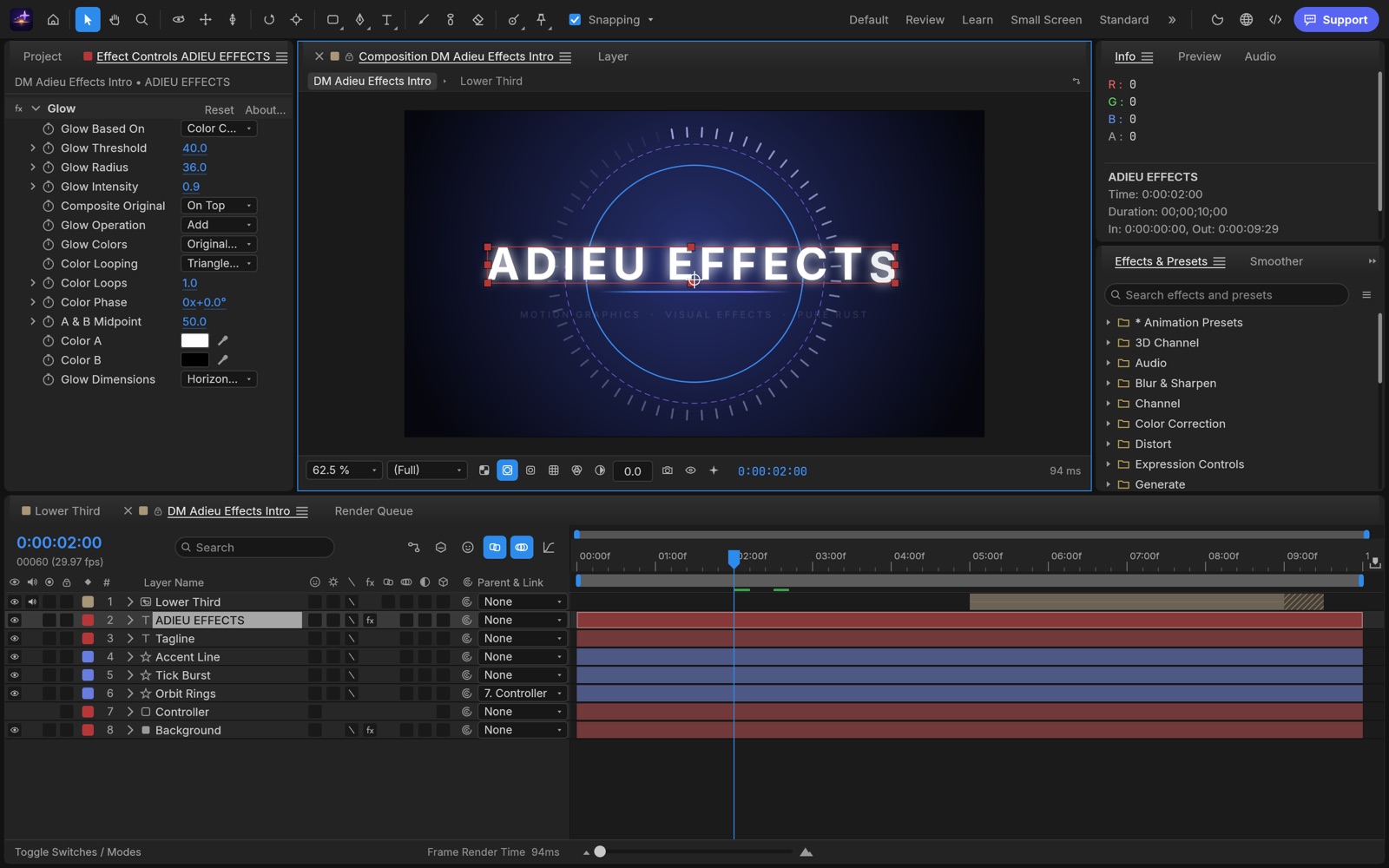
Coming to the Mac App Store.
DM Adieu Effects is a compositor for motion graphics and visual effects on the Mac. Build animated titles, lower thirds, logo reveals and composites from layers and keyframes, add effects, and render finished movies or image sequences. It runs entirely on your Mac. No account, no subscription, no cloud.
Built on open source
DM Adieu Effects is based on EffectCraft, the open-source compositor by the ArtCraft team, written in Rust with a GPU renderer. We package it, run it inside the macOS App Sandbox, and support it. It is not affiliated with or endorsed by the ArtCraft team. The source it is built from is public, under the MIT and Apache licences.
What you get
- Compositions with layers, precomps, parenting, masks, track mattes and blend modes.
- Keyframes on any property, a Graph Editor for easing and velocity, and JavaScript expressions that link one property to another.
- Around 300 built-in effects: blurs, glows, colour correction, keying, distortion, generators, particles, transitions and time effects, plus layer styles and animation presets.
- Animated type with per-character animators, and shape layers with trim paths and repeaters.
- 3D layers with cameras, lights, shadows and depth of field.
- A Render Queue: H.264 MP4 through the Mac’s own video encoder, QuickTime ProRes with alpha, WebM (VP9 or AV1), animated GIF, PNG, JPEG, TIFF and OpenEXR sequences, WAV and AIFF, and Lottie for the web.
- Imports video, audio, stills and image sequences, layered PSD files, SVG, PDF and 3D models.
Honest about where it stands
The compositor underneath is young: an early release that improves every week, with render speed and fidelity still being tuned. Some tools are missing or rough. HEVC export is not part of this edition, and the optional trained models for Rotoscope Brush and face tracking are installed from a file instead of being downloaded inside the app. Updates will be frequent.
Mac only, macOS 11 or later, Apple silicon and Intel. Support · Privacy policy
DM Adieu Film Privacy Policy
Last updated: October 13, 2026
DM Adieu Film is published by Dependent Media. It is a video editor for the Mac. This policy explains what the app stores, what leaves your Mac, and what we can see.
The short version
DM Adieu Film collects nothing. There is no account, no sign-in and no server. The app has no network access: it cannot upload your projects or footage because it has no way to upload anything. We do not use advertising or analytics SDKs, and we do not track you across other apps or websites.
1. What is stored on your Mac
Your projects and exports live wherever you save them. The app keeps a crash-recovery copy of the open project, auto-save versions, render previews, proxies, its media cache, logs, your preferences and the list of recent projects. All of this stays in the app’s own sandboxed container on your Mac. None of it is uploaded. Deleting the app removes it.
2. Files and folders you open
The app runs in the macOS App Sandbox. It can read only the projects, clips and folders you give it yourself through the Open and Import dialogs, the folder picker, drag and drop, or the Finder, and it writes only where you choose to save or export. To keep a project’s media available after a restart, it stores a macOS “security-scoped bookmark” for each of those files and folders, in its own container; you can remove them by deleting the app.
It can also read and write your Movies folder, the default place for exports, and where voice-over takes and other media the app records go when the project’s own folder is not writable. It does not browse your Photos library or other folders, and it never asks for access to them.
3. Microphone
Voice-over recording reads the microphone. macOS asks for permission the first time you record; the audio goes into a file in your project’s folder or your Movies folder and nowhere else. You can decline and use every other feature.
4. What was removed for this edition
The open-source editor it is based on can download speech-to-text and natural-voice models from the internet. Those features are not compiled into DM Adieu Film, and the app has no network entitlement. Its developer control channel is not started.
5. Links
The Help menu and About window open pages on dependentmedia.com and the FilmCraft project’s pages in your web browser. Nothing is sent when you open them beyond what your browser sends to any website.
6. Children
The app collects no personal information from anyone, including children.
7. Changes
If this policy changes, the new version appears at this address with a new date.
8. Contact
Dependent Media, Sacramento, California. [email protected]
DM Adieu Film — Support
DM Adieu Film is a video editor for the Mac: a multi-track timeline, colour grading with scopes, an audio mixer, titles and captions, in a native app that runs entirely on your Mac. It is built on FilmCraft, the open-source video editor by the ArtCraft team, which Dependent Media packages, sandboxes and supports for the Mac App Store.
Getting started
The app opens with a demo project made of generated clips, titles and music, so you can try every tool before you import anything. Press Space to play, drag clips on the timeline, and switch workspaces (Editing, Color, Audio…) with the button at the top right. File › New › Project starts your own.
Projects, media and the sandbox
Because the app is sandboxed, it can only use the files and folders you give it: through File › Import and File › Open, by dragging files or folders onto the window, or by double-clicking a project (.fcproj) in the Finder. Media dropped on the Dock icon is imported. The app remembers every project, clip and folder you give it this way, so a project you reopen after a restart still finds its media. Importing a whole folder covers everything in it.
If a clip still shows as offline (for example a file you moved, or a disk that was not connected), use Link Media and choose the file, or a folder to search: that gives the app access again.
Save and Save As write the project file you choose. Auto-save versions, render previews and proxies are kept in the app’s own folder on your Mac (File › Recover Unsaved Changes and Browse Auto-Saves find them), not next to your project.
Exporting
The Export tab writes a movie to the folder shown under Location; the Movies folder is the default. Choose another folder with the … button. If you type a folder the app has not been given, it asks you to choose it once. Exports that write several files (image sequences, MXF OP-Atom, caption files, AAF and OMF with separate media) ask for their folder the same way.
H.264 and HEVC are encoded with your Mac’s hardware video encoder (VideoToolbox), which is fast but has one pass and no constant-quality mode: presets that ask for two passes run in one. For settings the hardware encoder cannot take (odd frame sizes, HDR in H.264), choose H.265 or Apple ProRes instead.
Voice-over
Record voice-over straight onto the timeline from a track header. macOS asks once for microphone access. Takes are saved next to your project when the app can write there, otherwise in Movies › DM Adieu Film.
Keyboard shortcuts
Edit › Keyboard Shortcuts lists every shortcut, lets you change them, and has layouts that match other editors you may know. J, K and L shuttle, I and O mark In and Out, comma and period insert and overwrite.
What is still rough
The editor it is built on is young and under heavy development. Camera files from some makers are not yet tested, long effects-heavy timelines and exports lean on the CPU, there is no AV1 or VP9 export and no third-party plug-ins. If something breaks, save your work, then tell us which file, what format and what you were doing.
Contact
Email [email protected] or use the contact form. Include your macOS version and the app version from DM Adieu Film › About.
DM Adieu Film — Edit, color & mix your videos
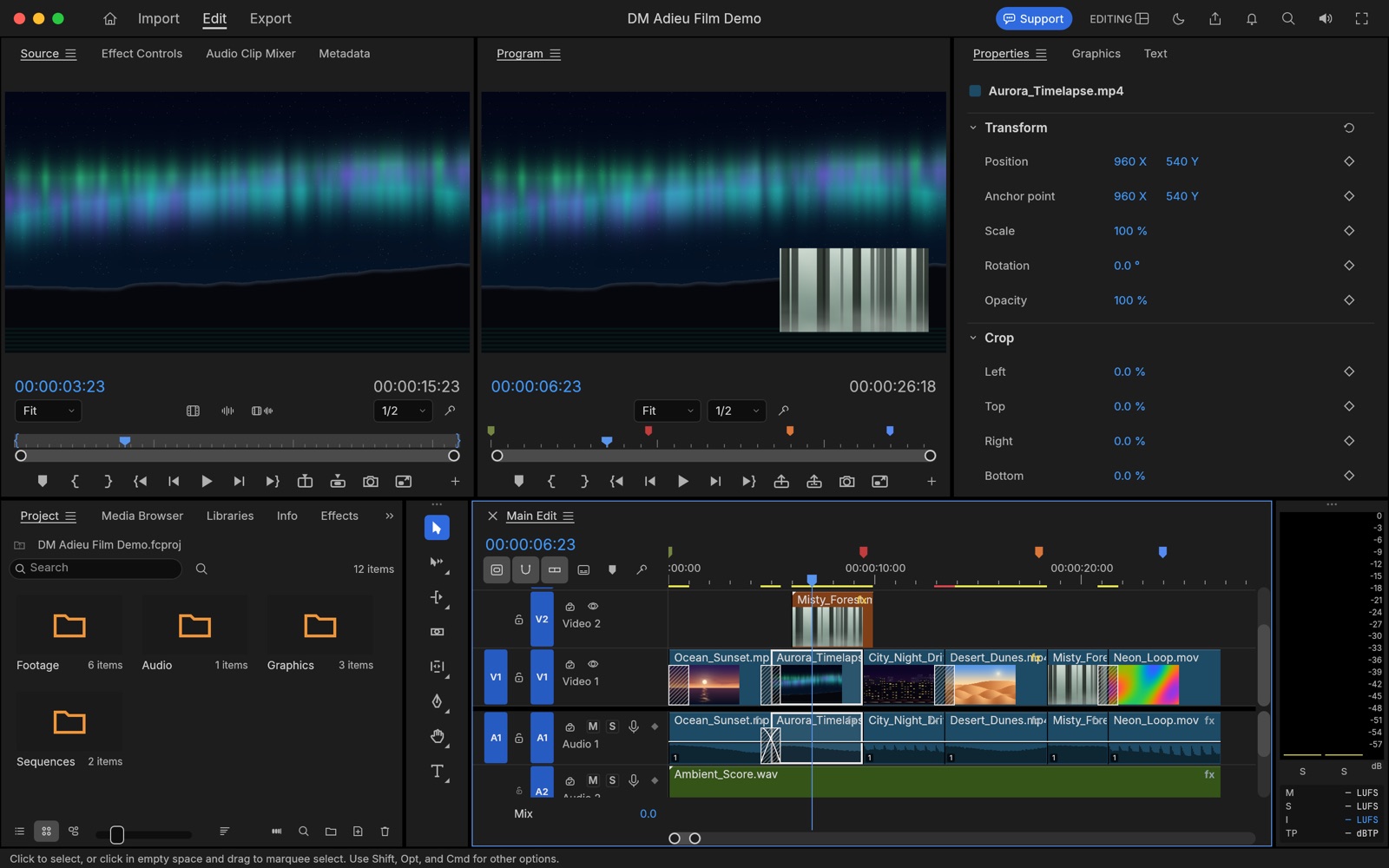
Coming to the Mac App Store.
DM Adieu Film is a native video editor for the Mac. Cut on a multi-track timeline, grade your shots with live scopes, mix the sound, add titles and captions, and export the result. It runs entirely on your Mac. No account, no subscription, no cloud.
Built on open source
DM Adieu Film is based on FilmCraft, the open-source video editor by the ArtCraft team, written in Rust with its own decoders and a GPU compositor. We package it, run it inside the macOS App Sandbox, and support it. It is not affiliated with or endorsed by the ArtCraft team. The source it is built from is public, under the MIT and Apache licences.
What you get
- Source and Program monitors, bins with thumbnails, and a multi-track timeline with three-point editing, ripple, roll, slip, slide, rate stretch and razor tools.
- Editing, Assembly, Color, Effects and Audio workspaces with dockable panels, markers, nesting and unlimited undo.
- Colour grading in linear light: basic correction, creative looks, curves, colour wheels, HSL secondary and vignette, with waveform, parade, vectorscope and histogram scopes. HDR (PQ and HLG) sequences.
- Transitions, keyframed motion and effects, blend modes and masks; titles, graphics templates and caption tracks (SRT, WebVTT, SCC, MCC, EBU STL, TTML).
- An audio track mixer, clip mixer, loudness meters and voice-over recording onto the timeline.
- Opens H.264, HEVC, ProRes, DNxHD/DNxHR, APV, MPEG-2, VP8, VP9 and AV1 video in MP4, MOV, MKV, WebM, MXF, AVI and MPEG-TS. Exports H.264 and HEVC with the Mac’s hardware encoder, Apple ProRes, DNxHR, MXF, image sequences, GIF and audio. Timelines travel as EDL, FCP XML, FCPXML, OpenTimelineIO, AAF and OMF.
Honest about where it stands
The editor underneath is young and improving every week. Expect rough edges: camera files from every maker are not yet tested, effects-heavy edits lean on the CPU, and there is no AV1 or VP9 export and no third-party plug-ins. Speech-to-text transcription and the downloadable natural voices are not part of this edition. Updates will be frequent.
Mac only, macOS 11 or later, Apple silicon and Intel. Support · Privacy policy
DM Adieu Design Privacy Policy
Last updated: October 13, 2026
DM Adieu Design is published by Dependent Media. It is a page-layout app for the Mac. This policy explains what the app stores, what leaves your Mac, and what we can see.
The short version
DM Adieu Design collects nothing. There is no account, no sign-in and no server. The app contains no code for talking to the internet: it cannot upload your documents because it has no way to upload anything. We do not use advertising or analytics SDKs, and we do not track you across other apps or websites.
1. What is stored on your Mac
Your documents live wherever you save them. The app keeps a recovery copy of unsaved documents, so a crash does not lose your work, along with your preferences, workspaces, a log file and the list of files you have opened or placed (so they stay reachable after a restart). All of this stays in the app’s own sandboxed container on your Mac. None of it is uploaded. Deleting the app removes it.
2. Files and folders the app can reach
The app runs in the macOS App Sandbox with these permissions only:
- Files you choose (read and write): documents, pictures, books and data sources you pick in the Open, Place and Save dialogs, drag onto the window or open from the Finder.
- Remembered files: the app keeps macOS’s permission for those same files, so they open and save again after a restart. It does not reach anything you have not chosen.
- Printing: File › Print sends the pages to the printers set up on your Mac.
Like every Mac app, it can also read the fonts installed on your Mac, including those in your own Fonts folder, so you can use them in your layouts. It does not browse your documents, photos or other folders, and it never asks for access to them.
3. What is not in this version
The open-source app it is based on can be driven from other programs over a local network connection and links to an online community. The App Store version has no network permission at all: the remote-control connection cannot open, and the Help menu links to our own support pages instead.
4. Links
The Help menu opens pages on dependentmedia.com and the DesignCraft project’s pages in your web browser. Nothing is sent when you open them beyond what your browser sends to any website.
5. Children
The app collects no personal information from anyone, including children.
6. Changes
If this policy changes, the new version appears at this address with a new date.
7. Contact
Dependent Media, Sacramento, California. [email protected]
DM Adieu Design — Support
DM Adieu Design is a page-layout app for the Mac: spreads, frames, styles, a paragraph composer and press-ready PDF, in a native app that runs entirely on your Mac. It is built on DesignCraft, the open-source page-layout app by the ArtCraft team, which Dependent Media packages, sandboxes and supports for the Mac App Store.
Getting started
Choose Help › Sample Document to open a finished four-page magazine and look around. To start your own, click New file on the Home screen or choose File › New › Document, pick a size, then draw a text frame with the Type tool and start typing. File › Place adds a picture or a text file; the Properties panel on the right shows the settings of whatever is selected.
Opening and saving files
Use File › Open, drag a document onto the window, or double-click it in the Finder. The app opens its own .designcraft documents and IDML interchange files. File › Save (⌘S) writes a .designcraft document that holds the layout and every placed picture. File › Export PDF, Export Page as PNG, Export EPUB, Export HTML and Export IDML write a copy for print, screen or another app.
Because the app is sandboxed, it can only read and write files you choose yourself: through the Open, Place and Save dialogs, by dragging them onto the window, or from the Finder. Documents and pictures you have opened, placed or saved stay available after a restart, so a document the app recovers after a crash saves back to its own file. If macOS ever refuses to save a document in its old place, Save asks where to save it instead.
Pictures and fonts
Placed pictures are kept inside the document, so it opens anywhere, and the Links panel remembers where each one came from. Relink to Folder can only see the file you choose in the sandbox, not the rest of the folder: choose each moved picture with Relink… instead. Fonts that come with macOS and fonts you install with Font Book are ready to use. Fonts in a Document Fonts folder next to a document are not loaded by the App Store version, because the sandbox cannot reach that folder: install them with Font Book instead.
Books, data merge and packages
A book (.dcbook) and a data-merge source are files you choose, and they work as usual. A book’s chapters live in their own files: if one will not open after a restart, open it once with File › Open. File › Package creates the folder you name and gathers the document, its pictures, its fonts (where their licences allow) and an IDML copy into it.
Printing
File › Print (⌘P) lists the printers set up on your Mac, with copies and the page range. The pages go to the macOS printing system as PDF, like any other app’s.
What is still rough
The app it is built on is young and under heavy development. Interchange files from other apps may not open exactly as they were made, and some panels and dialogs are still rough. Updates arrive often. If something breaks, save your work, then tell us which file, what was selected and what you were doing.
Contact
Email [email protected] or use the contact form. Include your macOS version and the app version from DM Adieu Design › About DM Adieu Design.
DM Adieu Design — Page layout for print and PDF
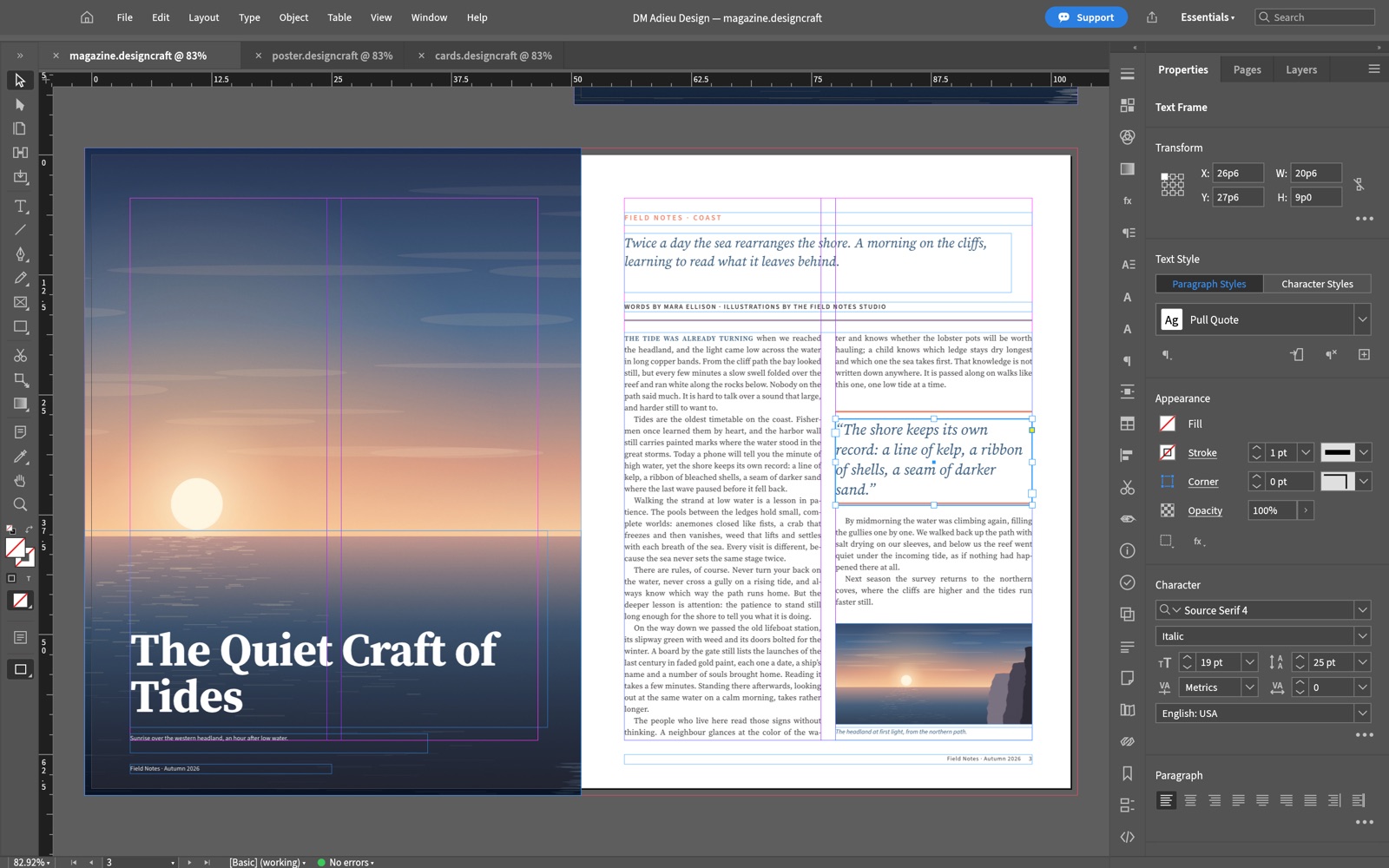
Coming to the Mac App Store.
DM Adieu Design is a native page-layout app for the Mac: magazines, brochures, posters, flyers, newsletters and business cards, set with care and sent to print as PDF. It runs entirely on your Mac. No account, no subscription, no cloud.
Built on open source
DM Adieu Design is based on DesignCraft, the open-source page-layout app by the ArtCraft team, written in Rust. We package it, run it inside the macOS App Sandbox, and support it. It is not affiliated with or endorsed by the ArtCraft team. The source it is built from is public, under the MIT and Apache licences.
What you get
- Facing-page spreads, parent pages, margins and columns, guides, bleed and slug, and layers.
- Frames for text, pictures and colour: group, align, distribute, step-and-repeat, and wrap text around them.
- A paragraph composer that weighs every line break in a paragraph at once, with tunable hyphenation and justification.
- Paragraph, character and object styles, rules, multi-column frames, a baseline grid, tabs, tables, footnotes and cross-references.
- CMYK, RGB and spot swatches, tints, gradients, transparency, drop shadows, glows and feathering.
- Pictures in PNG, JPEG, TIFF, GIF, WebP, SVG and PDF, kept inside the document so it travels as one file.
- Press-ready PDF (including PDF/X-4) with crop marks and bleed, print booklets, PNG, EPUB, HTML and IDML export, Preflight, Package and printing.
- QR codes, and data merge from a spreadsheet into a template.
Honest about where it stands
This is an early release of a young app that improves every week. The layout, type and output tools above work today, but there are gaps. Interchange files made in other apps may not open exactly as they were made, and some panels and dialogs are still rough. Updates will be frequent.
Mac only, macOS 11 or later, Apple silicon and Intel. Support · Privacy policy
DM Adieu PDF Privacy Policy
Last updated: October 13, 2026
DM Adieu PDF is published by Dependent Media. It is a PDF reader and editor for the Mac. This policy explains what the app stores, what leaves your Mac, and what we can see.
The short version
DM Adieu PDF collects nothing. There is no account, no sign-in and no server. The app contains no code for talking to the internet: the open-source editor it is built on can check GitHub for new releases, and we removed that check, so updates come only from the Mac App Store. The app cannot upload your documents because it has no way to upload anything. We do not use advertising or analytics SDKs, and we do not track you across other apps or websites.
1. What is stored on your Mac
Your documents live wherever you save them. In its own sandboxed container the app keeps your preferences, the list of recently opened files and pinned folders (with the macOS permission to open them again), a recovery copy of documents with unsaved changes, images you paste from the clipboard, digital IDs you create in the app, and a log file for troubleshooting. None of it is uploaded. Deleting the app removes it.
2. Files and folders it can reach
The app runs in the macOS App Sandbox. It can read only the files you open yourself through the Open dialog, by drag and drop, or from the Finder, and it can write only where you choose to save. When an export makes several files, or when you pin a folder to the Home screen, it can reach the folder you chose and nothing outside it. It does not browse your documents and never asks for access to them.
3. Digital IDs and the Keychain
When you sign with a digital ID from your Keychain, macOS asks whether DM Adieu PDF may use that key. The private key stays in the Keychain; the app only asks it to sign. Nothing about your certificates leaves your Mac except what you choose to put in a signed document.
4. Printing
File › Print hands the document to the macOS print system, which sends it to the printer you choose. The app lists the printers set up on your Mac to show them in its Print dialog.
5. Documents that ask to reach the internet
Some PDFs contain links, scripts or forms that submit their data to a web address. Scripts run in a sandbox with no file or network access. The app never submits form data anywhere, and it opens a web or email link from a document only after asking you, in your browser or email app.
6. Links
The Help menu opens pages on dependentmedia.com and the PdfCraft project’s pages in your web browser. Nothing is sent when you open them beyond what your browser sends to any website.
7. Children
The app collects no personal information from anyone, including children.
8. Changes
If this policy changes, the new version appears at this address with a new date.
9. Contact
Dependent Media, Sacramento, California. [email protected]