Archive for October 2026
DM Adieu PDF — Support
DM Adieu PDF is a PDF reader and editor for the Mac: comments, forms, signatures, redaction and page organizing, in a native app that runs entirely on your Mac. It is built on PdfCraft, the open-source PDF editor by the ArtCraft team, which Dependent Media packages, sandboxes and supports for the Mac App Store.
Opening and saving files
Use File › Open, drag a PDF onto the window or the Dock icon, or choose DM Adieu PDF under Open With in the Finder. Images and text files you open are turned into a new PDF. File › Save adds your changes to the end of the file, so the original bytes stay intact; File › Save As writes a fresh copy wherever you choose. Unsaved work is autosaved every minute and offered back if the app ever quits unexpectedly.
Because the app is sandboxed, it can only read and write files you choose yourself: through the Open and Save dialogs, by dragging them onto the window, or from the Finder. Files you have opened or saved, and folders you pin to the Home screen, stay available after a restart. When macOS wants you to choose a file again (for example one opened before an update), the app says so and shows the Open dialog on its folder, so one click opens it.
Exporting
Export a PDF writes pages as images, the text as a plain text file, or a Word document. Exports that make several files (one image per page, a split document) ask you to choose a folder first, and write everything there.
Printing
File › Print shows the printers set up on your Mac, with copies, two-sided printing, paper and scaling, and the printer’s own options. You can also choose Save as PDF in the same dialog.
Comments and markup
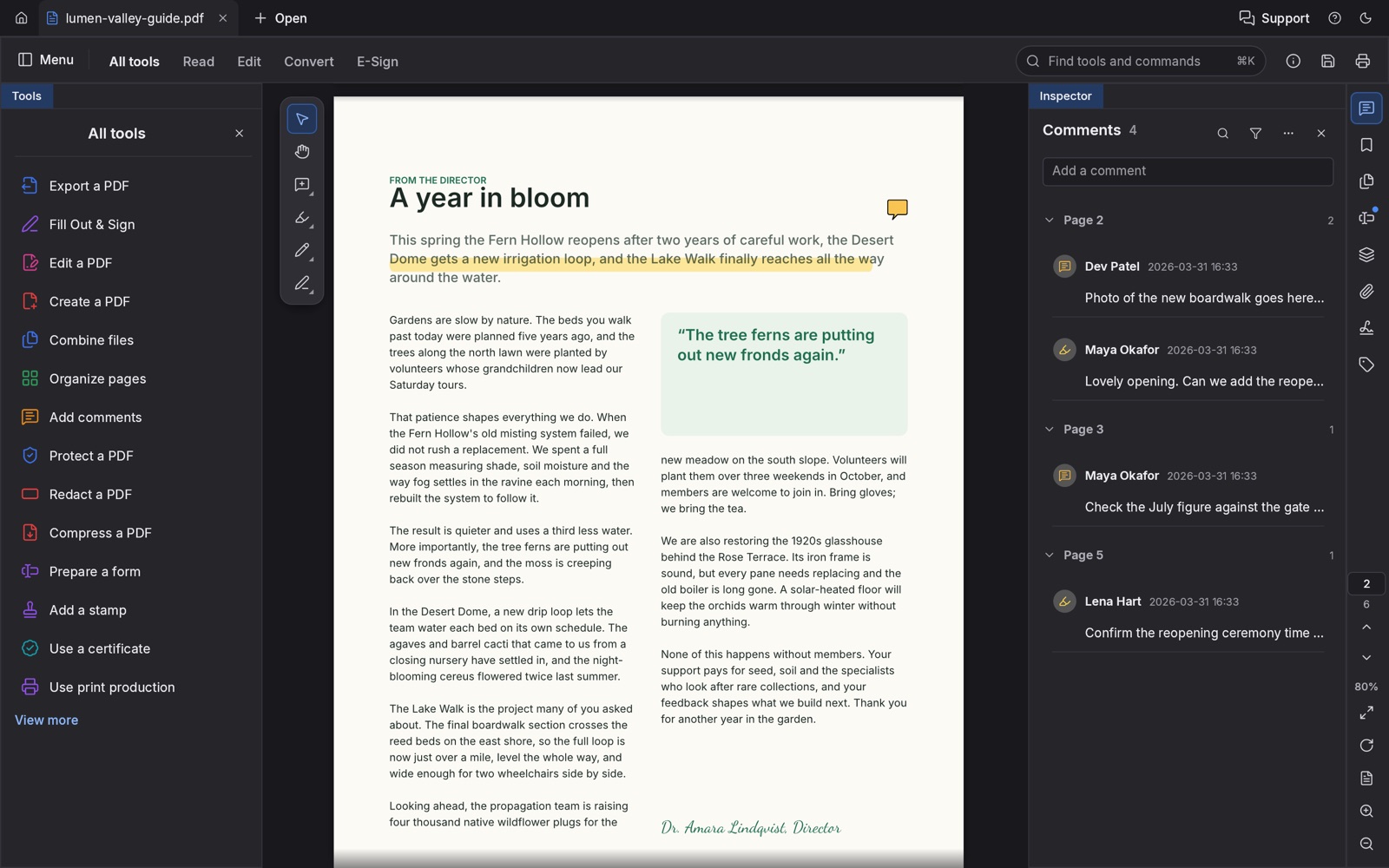
Choose Add comments in the All tools panel, then highlight or underline text, or drop a note anywhere on the page. The Comments panel lists every comment by page; reply to one to start a thread, and filter or search when there are many.
Forms
Click into a field and type; Tab moves to the next one. Check boxes, radio buttons and lists work as you would expect, and calculated fields update as you go. The Fields panel lists every field with its value. Prepare a form adds fields to a PDF that has none.
Signing
Fill Out & Sign adds your handwritten signature as an image: draw it, type it, or photograph a signature on white paper and the app removes the paper. To sign with a certificate, choose Use a certificate and pick a digital ID from your Keychain (macOS asks before the app may use its key), or create a self-signed ID in the app. Smart cards are not supported in this version.
What is still rough
The editor it is built on is young and under heavy development. Editing text that is already in a PDF can misplace or restyle it on some files, Word export does not keep the layout, dynamic XFA forms show only their placeholder page, and text recognition for scanned pages is not in this first version. Updates arrive often. If something breaks, save your work, then tell us which file (or a copy with private details removed), and what you were doing.
Contact
Email [email protected] or use the contact form. Include your macOS version and the app version from Help › About DM Adieu PDF.
DM Adieu PDF — Edit, sign and organize PDFs
Coming to the Mac App Store.
DM Adieu PDF is a native PDF reader and editor for the Mac. Read, comment, fill in forms, sign, redact and reorganize PDFs in one fast app that runs entirely on your Mac. No account, no subscription, no cloud.
Built on open source
DM Adieu PDF is based on PdfCraft, the open-source PDF editor by the ArtCraft team, written in Rust. We package it, run it inside the macOS App Sandbox, and support it. It is not affiliated with or endorsed by the ArtCraft team. The source it is built from is public, under the MIT and Apache licences.
What you get
- Sharp pages at any zoom, continuous, single-page and two-up layouts, a distraction-free Read mode, and light and dark themes.
- Organize pages like cards on a table: rotate, delete, reorder, insert, extract and split. Combine any number of PDFs into one, with links, form fields, layers and attachments kept.
- Highlights, notes and threaded comments, with a Comments panel to review them page by page.
- Interactive forms: fill in text fields, check boxes, radio buttons and lists, including calculated fields, and prepare forms of your own.
- Signatures: sign with an image of your handwritten signature, or with a digital ID from your Keychain or one you create in the app.
- Redaction that removes what is underneath for good, password protection, headers and footers, page numbers, watermarks and backgrounds.
- Incremental saves that leave the original bytes intact, deep undo that survives a save, and automatic recovery after a crash.
Honest about where it stands
The editor underneath is young and improving quickly. Editing text that is already in a PDF is still fragile on some files, exporting to Word does not keep the layout, and some forms and scripts are only partly supported. Text recognition for scanned pages is not in this first version. Updates will be frequent.
Mac only, macOS 11 or later, Apple silicon and Intel. Support · Privacy policy
DM Adieu Light Privacy Policy
Last updated: October 13, 2026
DM Adieu Light is published by Dependent Media. It is a photo library and raw developer for the Mac. This policy explains what the app stores, what leaves your Mac, and what we can see.
The short version
DM Adieu Light collects nothing. There is no account, no sign-in and no server. The App Store version contains no code that talks to the internet: the open-source editor it is based on can download optional machine-learning models and look up place names online, and both features are removed from this version. We do not use advertising or analytics SDKs, and we do not track you across other apps or websites.
1. What is stored on your Mac
Your library, previews, edits and the photos copied into it live in “DM Adieu Light Library” in your Pictures folder. Exports go to “DM Adieu Light Exports” in Pictures unless you choose another folder. Preferences live in the app’s own sandboxed container. None of it is uploaded. Deleting the app leaves your library and photos where they are, so you keep them.
2. What the app can reach
The app runs in the macOS App Sandbox. It can read and write your Pictures folder, where its library lives, and any file or folder you choose yourself in an Open or Save panel. It remembers folders you chose so they stay available after a restart. It does not read your Photos library and never asks for access to it.
3. Photo metadata
Photos often carry metadata such as the camera, the date and sometimes a location. The app reads it to organise and display your photos. It stays on your Mac. When you export, you choose whether metadata is included.
4. Links
The Help menu opens pages on dependentmedia.com and the LightCraft project’s pages in your web browser. Nothing is sent when you open them beyond what your browser sends to any website.
5. Children
The app collects no personal information from anyone, including children.
6. Changes
If this policy changes, the new version appears at this address with a new date.
7. Contact
Dependent Media, Sacramento, California. [email protected]
DM Adieu Light — Support
DM Adieu Light is a photo library and raw developer for the Mac, based on LightCraft, the open-source photo editor by the ArtCraft team. Dependent Media packages it for the Mac App Store and supports it.
Your library
The first time you open the app it creates a library called “DM Adieu Light Library” in your Pictures folder. Use File › Import Photos… or Import from Folder… to bring photos in. By default each photo is copied into the library’s Originals folder, organised by date, so the library keeps working even if the original card or folder goes away.
Because the app is sandboxed, it reads only the files and folders you choose in an Open panel, plus its library in Pictures. Folders you choose are remembered, so they stay available after a restart. If a photo you added in place shows as missing, use File › Find Missing Photos… and point the app at its folder again.
Developing a photo
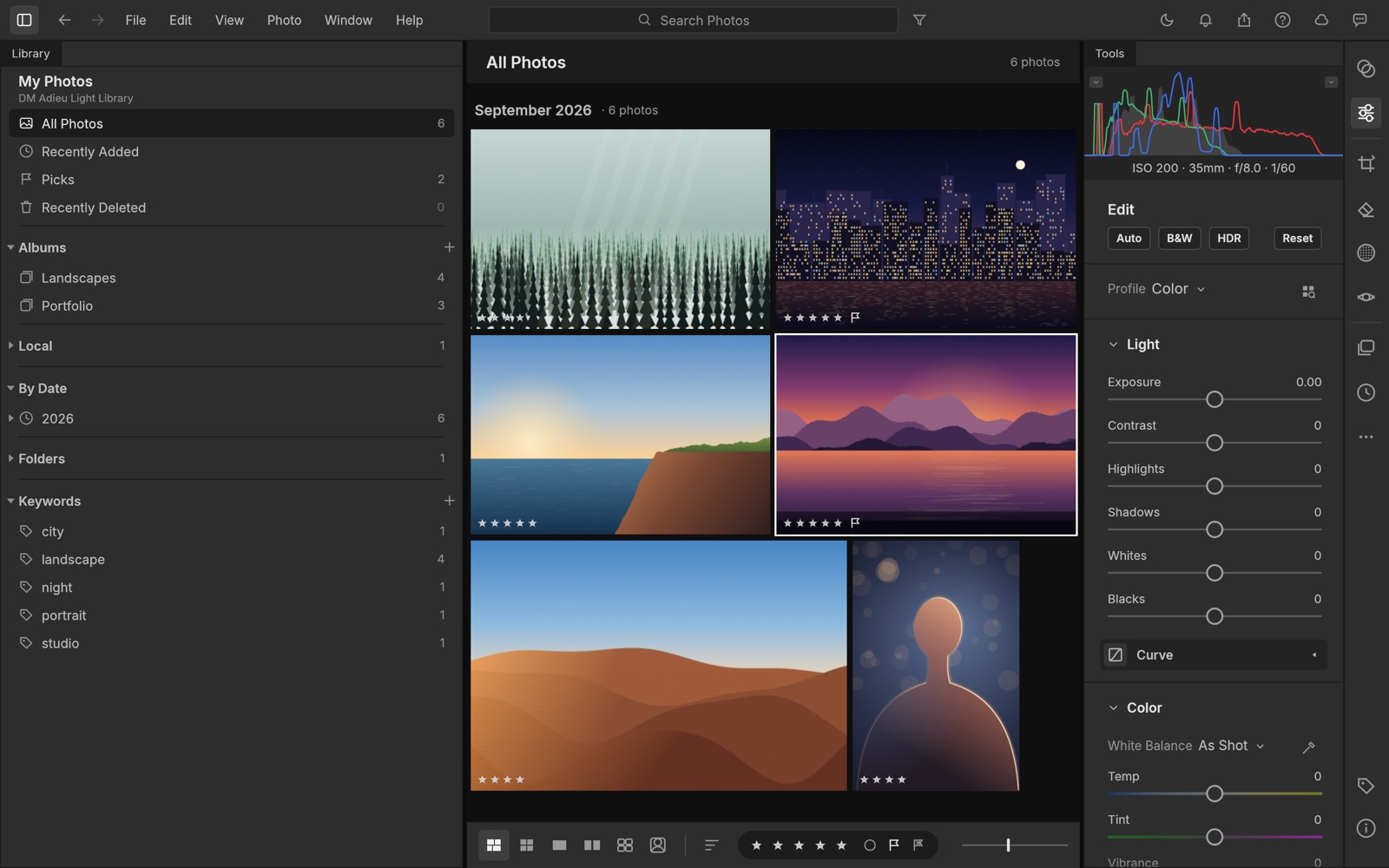
Select a photo and use the Edit panel on the right: the Light, Color and Effects sections, the tone curve, and masks for local edits. Every change is non-destructive and can be reset. Auto, B&W and HDR give you a quick starting point. Copy Edit Settings applies one photo’s look to others.
Exporting
File › Export › Custom… lets you choose the format, size, quality, sharpening and metadata. Exports go to the “DM Adieu Light Exports” folder in Pictures unless you choose another folder.
What is still rough
The editor it is built on is young and under heavy development. HEIC photos are not supported in this version, sending photos to the Photos app is not available, and some tools may behave differently from what you are used to. Updates arrive often. If something breaks, tell us what you were doing and which kind of photo you were working on.
Contact
Email [email protected] or use the contact form. Include your macOS version and the app version from DM Adieu Light › About.
DM Adieu Light — Photo library & raw developer
Coming to the Mac App Store.
DM Adieu Light is a photo library and raw developer for the Mac. Import your photos, rate, flag and sort them, and develop them with a full set of non-destructive tools. It runs entirely on your Mac: no account, no subscription, no cloud. Your library lives in your Pictures folder.
Built on open source
DM Adieu Light is based on LightCraft, the open-source photo editor by the ArtCraft team, written in Rust. Dependent Media packages it, runs it inside the macOS App Sandbox and supports it. It is not affiliated with or endorsed by the ArtCraft team. The source it is built from is public, under the MIT and Apache licences.
What you get
- A library with albums, smart albums, keywords, ratings, flags and a browse-by-date view.
- Non-destructive develop tools: exposure, contrast, highlights, shadows, whites and blacks; white balance; vibrance and saturation; an 8-band color mixer and three-way color grading; texture, clarity, dehaze, vignette and grain; tone curves.
- Masks to apply edits to part of a photo, plus presets and Copy Edit Settings for batches.
- Raw files from most cameras, plus JPEG, PNG, TIFF and more.
- Export to JPEG, PNG, TIFF, WebP and other formats, with resizing, sharpening and metadata options.
Honest about where it stands
The editor underneath is young and improving every week. Some features you may know from other photo apps are missing or still rough, and there are no generative features. In this first App Store version, photos are copied into your library when you import them, and sending photos to the Photos app is not available yet.
Mac only, macOS 11 or later, Apple silicon and Intel. Support · Privacy policy
DM Adieu Vector Privacy Policy
Last updated: October 13, 2026
DM Adieu Vector is published by Dependent Media. It is a vector illustration app for the Mac. This policy explains what the app stores, what leaves your Mac, and what we can see.
The short version
DM Adieu Vector collects nothing. There is no account, no sign-in and no server. The App Store version has no network access: it cannot upload your artwork because it has no way to upload anything. There is no update checker, no crash reporter and no analytics, and we do not track you across other apps or websites.
1. What is stored on your Mac
Your documents live wherever you save them. The app keeps recovery copies of documents with unsaved changes, so a crash does not lose them, along with your preferences, workspaces, swatch and style libraries, a log file, and the list of recently opened files with the permission macOS gave it to reopen them. All of this stays in the app’s own sandboxed container on your Mac. None of it is uploaded. Clearing File › Open Recent removes the saved permissions; deleting the app removes everything.
2. Files and folders it can reach
The app runs in the macOS App Sandbox. It can read only the files you open yourself through the Open dialog, by drag and drop, or from the Finder, and it can write only where you choose to save or export. When an export writes several files, or when you relink images or package a document, it asks you to choose a folder, and it uses only that folder. It also reads the fonts installed on your Mac so you can set type in them. It does not browse your documents, and it never asks for access to your Photos, contacts, camera, microphone or location.
3. Printing
File › Print sends the job to the printers set up in macOS. The app is allowed to talk to the macOS printing system for that, and for nothing else.
4. What is different from the open-source app
The App Store version leaves out what would need the network or reach outside the sandbox: the links to the original project’s community chat are replaced by our support page, and the local automation channel developers can switch on from the command line cannot open a connection. The AI-agent server that ships with the original project’s command-line tool is not part of this app.
5. Links
The Help menu, the About window and the Home screen open pages on dependentmedia.com, the VectorCraft project’s page on getartcraft.com and its source on GitHub in your web browser. Nothing is sent when you open them beyond what your browser sends to any website.
6. Plug-ins
Plug-ins you install yourself run inside the app with no access to the internet or to your files.
7. Children
The app collects no personal information from anyone, including children.
8. Changes
If this policy changes, the new version appears at this address with a new date.
9. Contact
Dependent Media, Sacramento, California. [email protected]
DM Adieu Vector — Support
DM Adieu Vector is a vector illustration app for the Mac. Pen and Bézier paths, shapes, gradients, type, artboards and layers, in a native app that runs entirely on your Mac. It is built on VectorCraft, the open-source editor by the ArtCraft team, which Dependent Media packages, sandboxes and supports for the Mac App Store.
Opening and saving files
Use File › Open, drag a file onto the window or the Dock icon, or double-click a file in the Finder. The app opens its own .vectorcraft documents and .vctemplate templates, SVG and SVGZ, PDF, EPS, DXF, EMF and WMF files, and PNG, JPEG, GIF, WebP, TIFF and BMP images. File › Save keeps everything editable in a .vectorcraft document; Save As can also write PDF or SVG. File › Export › Export As writes PNG, JPEG, WebP, GIF, TIFF, SVG, PDF, EPS, DXF and more.
Because the app is sandboxed, it can only read and write files you choose yourself: through the Open and Save dialogs, by dragging them onto the window, or from the Finder. Files you have opened or saved stay available under File › Open Recent after a restart. If macOS ever asks for a file again, the app says so and opens the Open dialog: choose the file there once.
An export that writes several files (one per artboard, or an SVG with linked images) first writes the file you named, then asks you to choose the folder for the others: choose the same folder to keep them together. Export for Screens asks for a folder from the start.
Drawing with paths
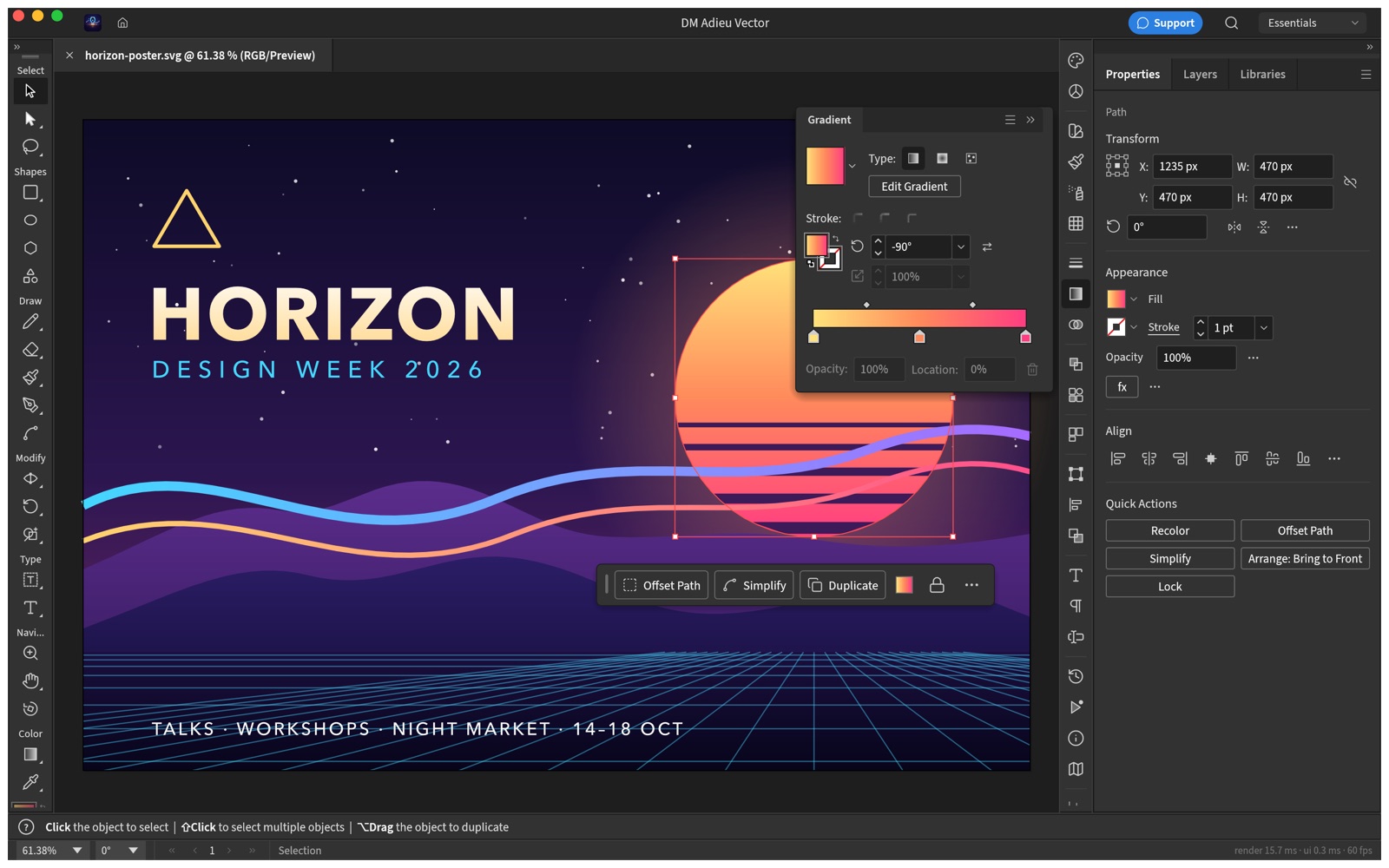
The Pen tool (P) places anchors: click for corners, drag for curves. The Direct Selection tool (A) moves single anchors and handles; the Curvature tool draws smooth curves from clicks alone. Combine shapes with the Pathfinder panel or the Shape Merge tool, and change any object’s look in the Properties panel, which shows the fills, strokes and effects of what is selected.
Linked images and fonts
Images you place with File › Place stay linked and keep working after a restart. A document from elsewhere may show its linked images as missing, because the sandbox has not been given their folder yet: use Relink to Folder in the Links panel and choose the folder once. Fonts installed on your Mac are available as usual. The App Store version does not offer the additional fonts, plug-ins, templates and recovery folder settings, because the sandbox cannot reach a folder typed as a path; recovery copies are kept in the app’s own folder.
Keyboard shortcuts
Edit › Keyboard Shortcuts lists every shortcut and lets you change it. Two sets are built in: DM Adieu Vector Defaults and Classic Defaults, which follows the shortcuts long-time vector artists already know.
Printing
File › Print shows the app’s print dialog with the printers set up on your Mac, the paper size, scaling and marks. The job goes to the macOS printing system like any other app’s.
What is still rough
The editor it is built on is young and under heavy development. Some tools and dialogs are missing or behave differently from what you may be used to: about half of the raster effects are still to come, and there is no scripting. Updates arrive often. If something breaks, save your work, then tell us which file, what was selected, and what you were doing.
Contact
Email [email protected] or use the contact form. Include your macOS version and the app version from DM Adieu Vector › About DM Adieu Vector.
DM Adieu Vector — Vector drawing, SVG and PDF
Coming to the Mac App Store.
DM Adieu Vector is a native vector illustration app for the Mac: the Pen and real Bézier paths, shapes, gradients, type, artboards and layers, with SVG and PDF files in and out. It runs entirely on your Mac. No account, no subscription, no cloud.
Built on open source
DM Adieu Vector is based on VectorCraft, the open-source editor by the ArtCraft team, written in Rust and drawn on the GPU. We package it, run it inside the macOS App Sandbox, and support it. It is not affiliated with or endorsed by the ArtCraft team. The source it is built from is public, under the MIT and Apache licences.
What you get
- The Pen, Curvature, Pencil and shape tools, with anchors and handles you edit directly.
- Pathfinder and Shape Merge, offset and outline paths, live corners and blends.
- Linear, radial and freeform gradients, swatches, Recolor, transparency and blend modes.
- Several fills and strokes on one object, and live effects such as shadows and glows that stay editable.
- Point and area type, type on a path, threading, character and paragraph styles, and right-to-left scripts.
- Multiple artboards, layers, symbols, guides, a perspective grid and Trace Image.
- Opens SVG, PDF, EPS, DXF, EMF and WMF files and common images. Exports PNG, JPEG, WebP, GIF, TIFF, SVG, PDF (including PDF/X), EPS and DXF, one artboard or all of them at once, and prints.
Honest about where it stands
The editor underneath is young (an alpha) and improving every week. Everyday illustration works, but some tools you may be used to are missing or still rough: about half of the raster effects are still to come, and there is no scripting and there are no generative features. Updates will be frequent. Expect a capable editor today and a better one each month.
Mac only, macOS 11 or later, Apple silicon and Intel. Support · Privacy policy
DM Adieu Photo Privacy Policy
Last updated: October 13, 2026
DM Adieu Photo is published by Dependent Media. It is an image editor for the Mac. This policy explains what the app stores, what leaves your Mac, and what we can see.
The short version
DM Adieu Photo collects nothing. There is no account, no sign-in and no server. The app contains no code for talking to the internet: it cannot upload your images because it has no way to upload anything. We do not use advertising or analytics SDKs, and we do not track you across other apps or websites.
1. What is stored on your Mac
Your documents live wherever you save them. The app keeps a recovery copy of whatever you have open, so a crash does not lose it, along with your preferences, brush presets, colour swatches and the list of recently opened files. All of this stays in the app’s own sandboxed container on your Mac. None of it is uploaded. Deleting the app removes it.
2. Files you open
The app runs in the macOS App Sandbox. It can read only the files you open yourself through the Open dialog, by drag and drop, or from the Finder, and it can write only where you choose to save. It does not browse your Photos library or your documents, and it never asks for access to them.
3. Screen colour picker
The Eyedropper can sample a colour from anywhere on screen. The first time you use it, macOS asks for Screen Recording permission, because that is how any app reads screen pixels. The app reads the single colour under the pointer while you hold the tool and keeps nothing else. You can decline and sample colours inside your document instead.
4. Links
The Help menu opens pages on dependentmedia.com and the PhotoCraft project’s pages in your web browser. Nothing is sent when you open them beyond what your browser sends to any website.
5. Smart selection and other on-device models
Select Subject and similar tools run machine-learning models that ship inside the app. They run on your Mac. No image, or part of one, is sent anywhere.
6. Children
The app collects no personal information from anyone, including children.
7. Changes
If this policy changes, the new version appears at this address with a new date.
8. Contact
Dependent Media, Sacramento, California. [email protected]
DM Adieu Photo — Support
DM Adieu Photo is an image editor for the Mac. Layers, masks, adjustment layers, layer styles, type, vector shapes, brushes, and layered PSD files, in a native app that runs entirely on your Mac. It is built on PhotoCraft, the open-source editor by the ArtCraft team, which Dependent Media packages, sandboxes and supports for the Mac App Store.
Opening and saving files
Use File › Open, drag a file onto the window or the Dock icon, or double-click a file in the Finder. The app opens PSD, PNG, JPEG, TIFF, WebP, BMP, GIF, OpenRaster and its own .pcraft documents, and camera raw files from most makers. Save keeps a layered document as PSD or .pcraft; Export writes a flat image.
Because the app is sandboxed, it can only read and write files you choose yourself: through the Open and Save dialogs, by dragging them onto the window, or from the Finder. Files you have opened stay available under File › Open Recent after a restart.
Non-destructive editing
Adjustment layers keep every edit live. Add Levels, Curves, Vibrance, Hue/Saturation and a dozen more from the Layer menu, mask them to an area, reorder them or switch them off, and your original pixels never change. Layer styles (Drop Shadow, Stroke, Outer Glow, Bevel & Emboss and the rest) work the same way on any layer, including type.
Keyboard shortcuts
The shortcuts are the ones working designers already know: ⌘J duplicates a layer, ⇧⌘D reselects, ⌘T transforms, B is the brush, V the move tool. Preferences › Keyboard Shortcuts lists every one and lets you change it.
Printing
File › Print uses the standard macOS print dialog. The app manages colours by default; choose the printer profile in the dialog if you prefer the printer to manage them.
What is still rough
The editor it is built on is young and under heavy development. Some tools and dialogs are missing or behave differently from what you may be used to, and the generative features of other editors are not here. Updates arrive often. If something breaks, save your work, then tell us which file, how many layers, and what you were doing.
Contact
Email [email protected] or use the contact form. Include your macOS version and the app version from DM Adieu Photo › About.